

CodeShellManager
Run multiple AI coding agents side-by-side in a single, organised window. Built for developers who use Claude Code seriously.
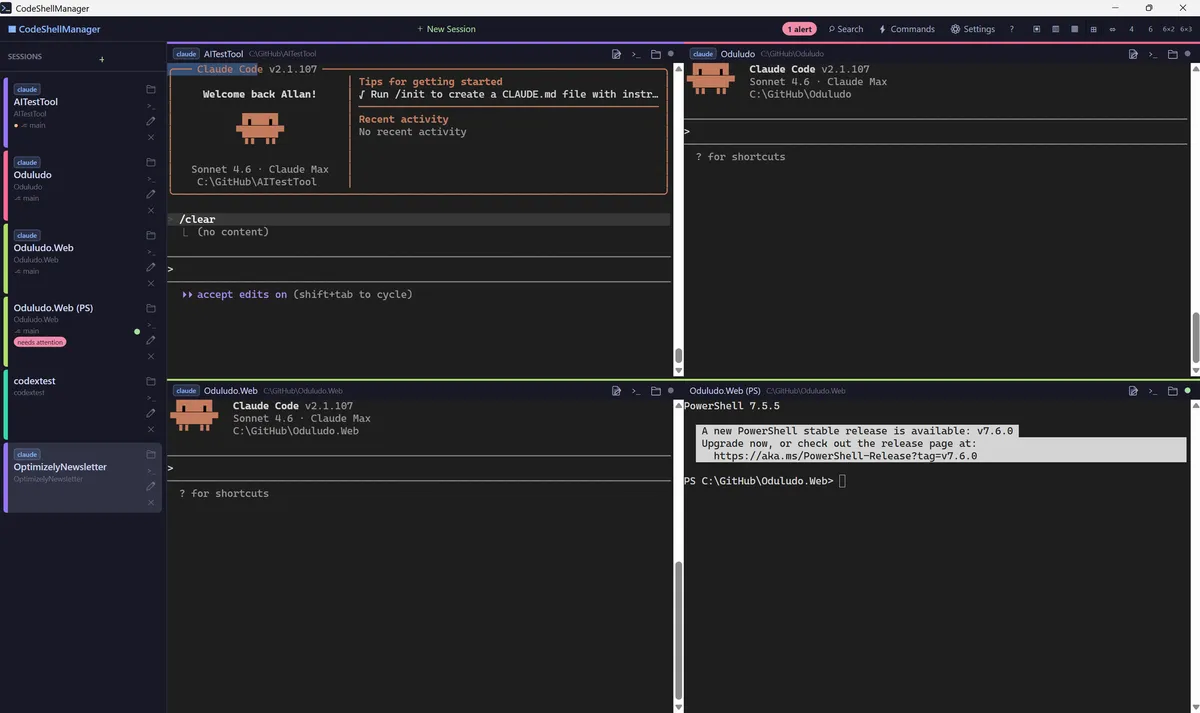
Four Claude Code sessions running simultaneously — each in its own pane with sidebar navigation, session names, and alert indicators
Real problems, real workflows
Running multiple Claude Code sessions in plain terminals is a mess. Output scrolls away, agents pause silently, and one accidental close eats hours of context. CodeShellManager is built to fix that.
One terminal is never enough
Running parallel AI agents means juggling windows, losing context, and missing the moment an agent needs your input. There is no good story for multi-agent work in a plain terminal.
Terminal output disappears
Scroll up far enough and it is gone. When you are running agents across multiple sessions all day, finding what an agent said three hours ago is impossible without indexed history.
Agents wait while you are not watching
Claude Code pauses for approvals and confirmations. Without alerts, a paused agent can sit idle for hours while you are focused on another session.
Sessions are fragile
Close a terminal by accident and the session context is gone. Picking up where you left off means starting over — unless your tool handles persistence.
Everything in one window
Free, open source, Windows-native. Install with winget and updates ride along with `winget upgrade --all`. No accounts, no cloud, no subscription.
- Up to 18 concurrent sessions across 9 grid layouts (1, 2, 3, 4, 6 cols, 2×2, 6×2, 6×3)
- Group sessions into named categories — filter strip or inline collapsible headers
- Per-group grid layout — switch group and the pane view follows
- Multi-select, drag-and-drop reordering, and bulk sleep / wake / close
- Right-click any git session → 'new worktree from this branch' launches the sibling instantly
- Sibling worktrees auto-detected when you start a new session in the same repo
- Shared accent colour and a 📁 cluster header for every session in the same repo
- Git branch and dirty-state shown per session in the sidebar
- Labelled commands per session — Test / Build / Watch / Run; F5 runs the default
- Runs land in a separate headless PTY, so your Claude session stays clean
- Output drawer with Stop, Copy, and 'Send to terminal' (fenced for Claude)
- Auto-seeded from project type — dotnet, cargo, node, python, make
- Full-text search across every session, past and present (SQLite FTS5)
- Smart alerts when Claude waits for input or tool approval — tray icon + balloon
- Sleep a session: free the PTY, keep the slot and notes for later
- Auto-resume the last Claude Code session on startup; SSH sessions persist
Built in 26 hours by agents
CodeShellManager started as an internal tool — we needed a better way to run multiple Claude Code sessions while building other projects. We scoped it, built it, and shipped the first public release in 26 hours using our own agentic development process. It is a working demonstration of what AI-native development looks like in practice.
The app has had dozens of releases since, ships with a full UI test suite, and is actively developed. Recent additions include session groups, one-click git worktrees, and per-session run commands.
Install
Requires Windows 10 (1903+) or Windows 11. Windows 11 users are ready to go. Windows 10 users may need the Microsoft Edge WebView2 Runtime (free download from Microsoft).
winget (recommended)
winget install UmageAI.CodeShellManagerFuture updates pick up automatically with winget upgrade --all.
Chocolatey
choco install codeshellmanagerDirect download
Or grab the portable ZIP — extract and run CodeShellManager.exe, no installation needed.
Build from source
git clone https://github.com/umage-ai/CodeShellManager.git
cd CodeShellManager
dotnet run --project src/CodeShellManager/CodeShellManager.csproj
Requires .NET 10 SDK. Full source, issues, and contribution guidelines on GitHub.