

Redline
Mark up a running web UI, and let an AI agent apply the changes.
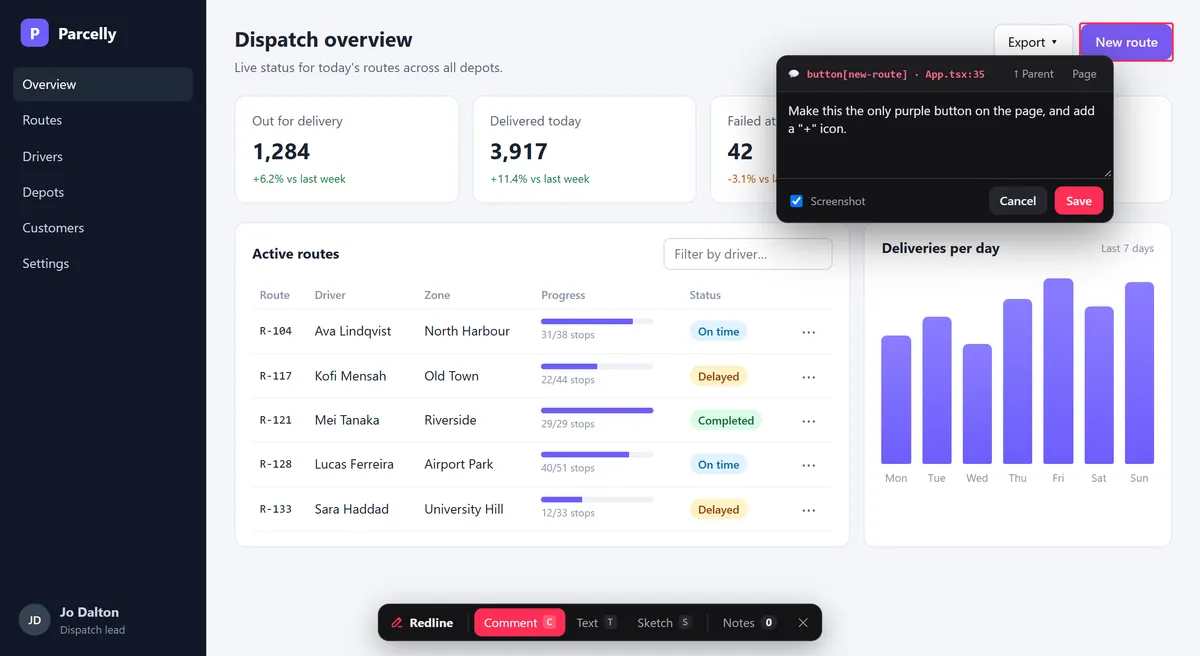
Commenting on a button: the popover names the element and its source, App.tsx:35
Catch the feedback while you are looking at it
The best feedback comes in the moment: you are clicking through the app and something is off. That is when it should be captured, on the page and with the detail that makes it useful, not rewritten from memory in a chat later.
Feedback is lost between seeing and writing
You spot something while using the app, then switch to a chat or a ticket to describe it. By then the detail has faded, or the note never gets written.
“The button on the right” is not a spec
Words and screenshots show what is wrong, not where it lives. The agent has to guess the component, the line and the content file, and it often guesses wrong.
The context disappears
Viewport, theme, scroll position and console errors decide what you saw. A bug that only shows in dark mode at phone width is easy to lose in a message.
Point at it, and the agent finds it
Press Alt+Shift+R in the browser, or tap the launcher on a phone, and pick a mode. Every note is saved by your dev server as markdown under .redline/, next to the code.
- Comment: click an element and type. Alt+click widens to the parent; Shift+click comments on the whole page
- Text: edit any text in place; it is saved as a diff of old and new, or, with directEdit on, written straight into the source file when the text is static
- Sketch: draw boxes, arrows, freehand and labels in six colours on top of the page
- Works on phones and tablets too, and open menus and dropdowns stay open while you pick
- Source file:line and the component chain, for React, Vue, Svelte, Solid, Preact, Astro and Angular
- The URL, a CSS selector, XPath and test id
- Viewport, theme and recent console errors
- A screenshot with the target outlined in red
- npx redline init installs the guide for Claude Code, Codex, Cursor, Copilot, Gemini CLI and others that read AGENTS.md
- The agent ticks each note and replies inline; replies appear live in the overlay
- An optional MCP server lets agents list, read and close notes as tools
- Markdown is the source of truth, so notes are plain files you can read and diff
- Runs only in the dev server (vite dev, astro dev, ng serve); nothing ships to production
- Vite (React, Vue, SvelteKit, Solid, Preact), Astro and Angular 17+, plus a middleware for other Node dev servers
- Monorepos work out of the box: every app's notes go to one .redline/ at the repo root
- MIT licensed, on npm as @umage.ai/redline
A look inside
Text mode
Click any text, rewrite it in place, and press Enter. The note is saved as a diff, so the agent knows exactly what to change.
Sketch mode
When words are slower than a drawing: boxes, arrows, freehand and labels, saved as SVG with a screenshot of the page underneath.
Notes and replies
Every note on the page or across the app, with the agent's reply on each one. Copy a ready-made prompt for your agent from the panel.
Built for how we work
We build software with AI agents every day, and the slowest part of a UI change was describing it. Redline came out of that: a way to point at the running app and leave the agent a note it can act on without guessing. Every framework it supports is covered by end-to-end tests, and we use it on this site.
See it in a minute
Install
Requires Node 20 or newer.
npm install -D @umage.ai/redline
npx redline init
redline init installs the agent guide (an Agent Skill plus a section in AGENTS.md, and the Claude Code, Gemini CLI or Copilot extras when the repo already uses them) and puts .redline/ in .gitignore. Add --mcp to register the MCP server as well.
Vite: React, Vue, SvelteKit, Solid, Preact
Put Redline first, before the framework plugin, in vite.config.ts:
import redline from '@umage.ai/redline/vite'

export default defineConfig({ plugins: [redline(), react()] })   // or vue(), sveltekit(), solid(), preact()
Astro
import redline from '@umage.ai/redline/astro'

export default defineConfig({ integrations: [redline()] })
Angular (CLI 17+)
Swap the serve builder in angular.json; ng build is untouched:
"serve": { "builder": "@umage.ai/redline:dev-server", "options": { "buildTarget": "app:build:development" } }Start your dev server, open the app and press Alt+Shift+R.
When you have left some notes, ask your agent to work through the open Redline notes. Full documentation, options and the source are on GitHub.