

Giving an AI agent feedback on a UI usually means screenshots, scribbles and a long chat message. Redline, our open-source overlay, lets you point at the running app instead, collect a batch of notes without breaking your flow, and hand the agent everything it needs to find the code.
Every week we hold a short retro on how we work, and one question always comes up: what did we spend time on this week that should have been automated by now?
For a while the same answer kept surfacing, on our presentation decks and on client projects alike. Giving an agent feedback on a UI it had built. Not the fixes themselves, which the agent made in seconds. Everything it took to tell it what to fix.
Nobody had decided that this was how we give feedback. It had just become the job.
”The button top right, next to the blue one”
Listen to how people describe UI changes today, to agents and to each other. “The button top right, next to the blue one.” “The second card, the heading is too big.” “On the settings page, under the toggle, there’s a weird gap.” Then a screenshot, either with arrows on it or without, and the hope that the reader works out which of the four blue buttons you meant.
That is how most UI feedback is still given. It works between people because the other person can ask. With an agent, it means the agent reads your description, greps for the word “Save”, finds it in eleven places and picks one.
The agents had become fast enough that the slow part wasn’t the change any more. It was explaining the change.
For small things, writing the instruction took longer than making the edit. You end up describing a five-word change in fifty words, or giving up and opening the file yourself. For bigger things it went the other way: a layout that felt wrong got a screenshot with arrows and half a novel attached, and the agent still had to guess which component we meant.
Both cases have the same root. We were translating something we could see into words, so the agent could translate the words back into something it could find.
The context-switching tax
The part that bothered me most wasn’t the typing. It was the round trip.
Here is what one finding actually cost. Spot something in the app. Open the snipping tool, grab the area, crop it, draw an arrow on it. Switch to the agent chat, paste the image, write the paragraph about what and where. Switch back to the browser. Find your place again, which is often harder than it sounds: the dropdown you had open has closed, the dialog is gone, the filter you set up to reproduce the problem has reset.
Then the next finding, and the same loop again. Browser, snipping tool, chat, browser. Ten findings is thirty switches.
And each switch is a switch of head, not just of window. In the app you’re a user, clicking around and noticing what feels wrong. In the chat you’re a developer, working out which component it is and how to describe it. After a few rounds you’re not really testing any more, you’re writing tickets, and the small things stop getting reported because each one costs a screenshot and a paragraph.
Call the agent over to your desk
If a colleague had built the screen, none of this would happen. You’d call them over to your desk, point at the screen, and say “this, here, make it less shouty”. They’d see what you see. Done in ten seconds.
I want to work with agents the same way I work with colleagues, so we built that: Redline, an overlay you open in the running app with Alt+Shift+R.
The modes map onto what you’d do at the desk:
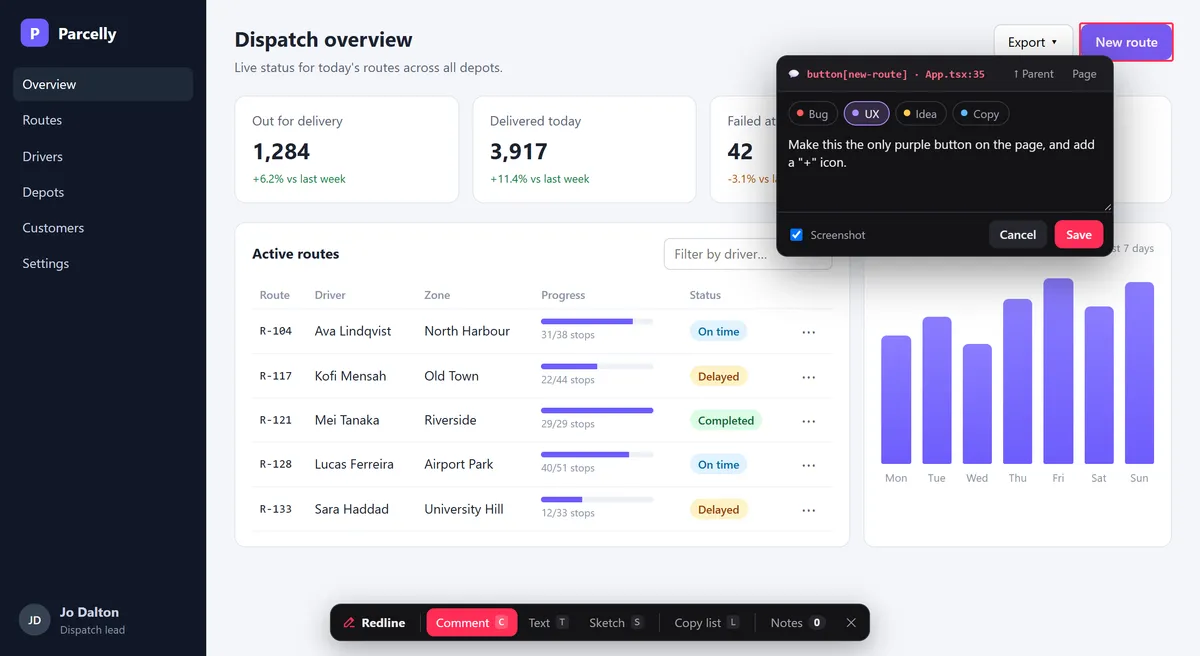
- Pointing is Comment. Click an element and say what you want.
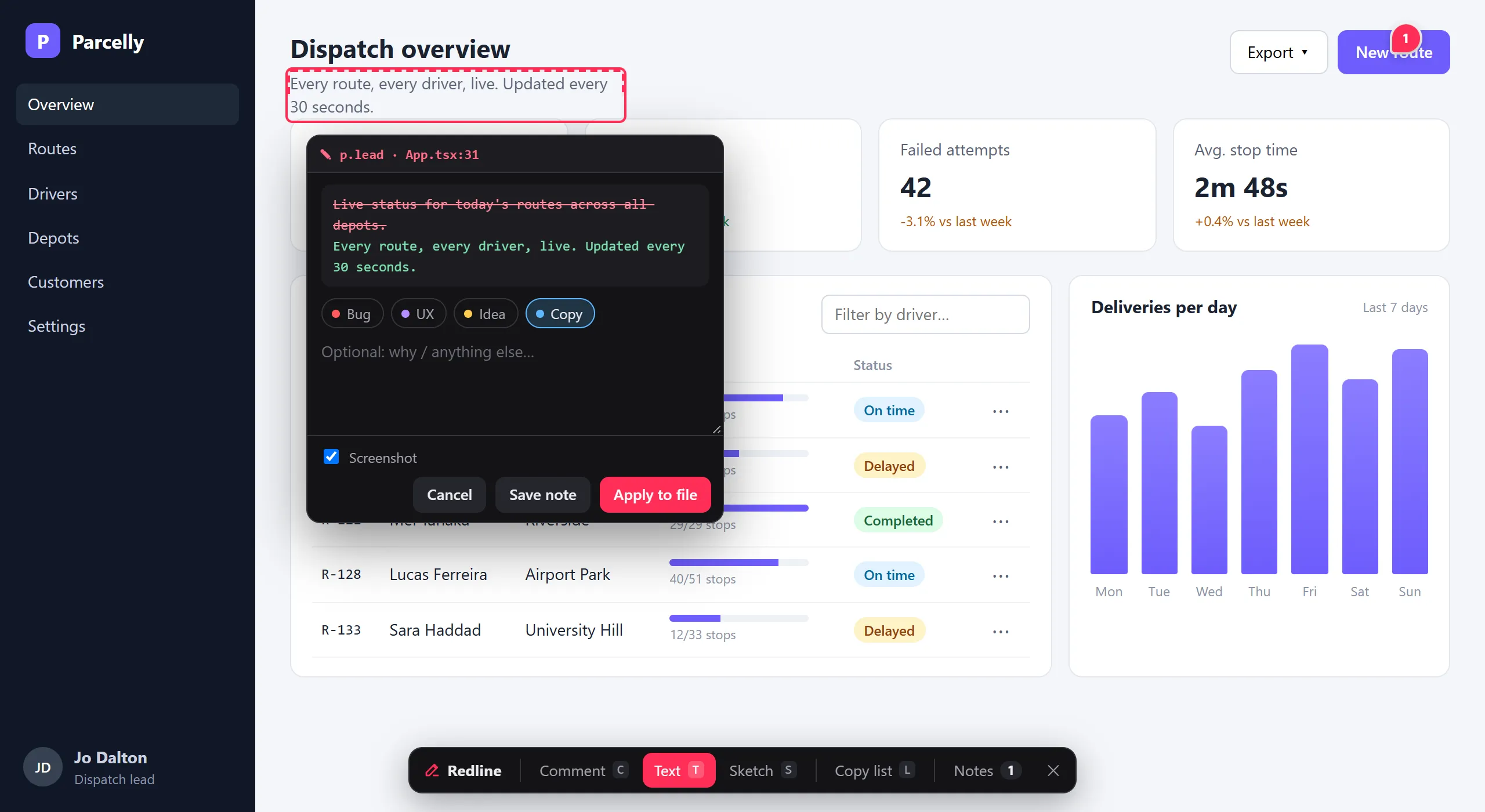
- “Change it to this” is Text. Click any text and rewrite it in place. If the text is static in the source, Redline can write it straight into the file, which settles the five-words-in-fifty problem.
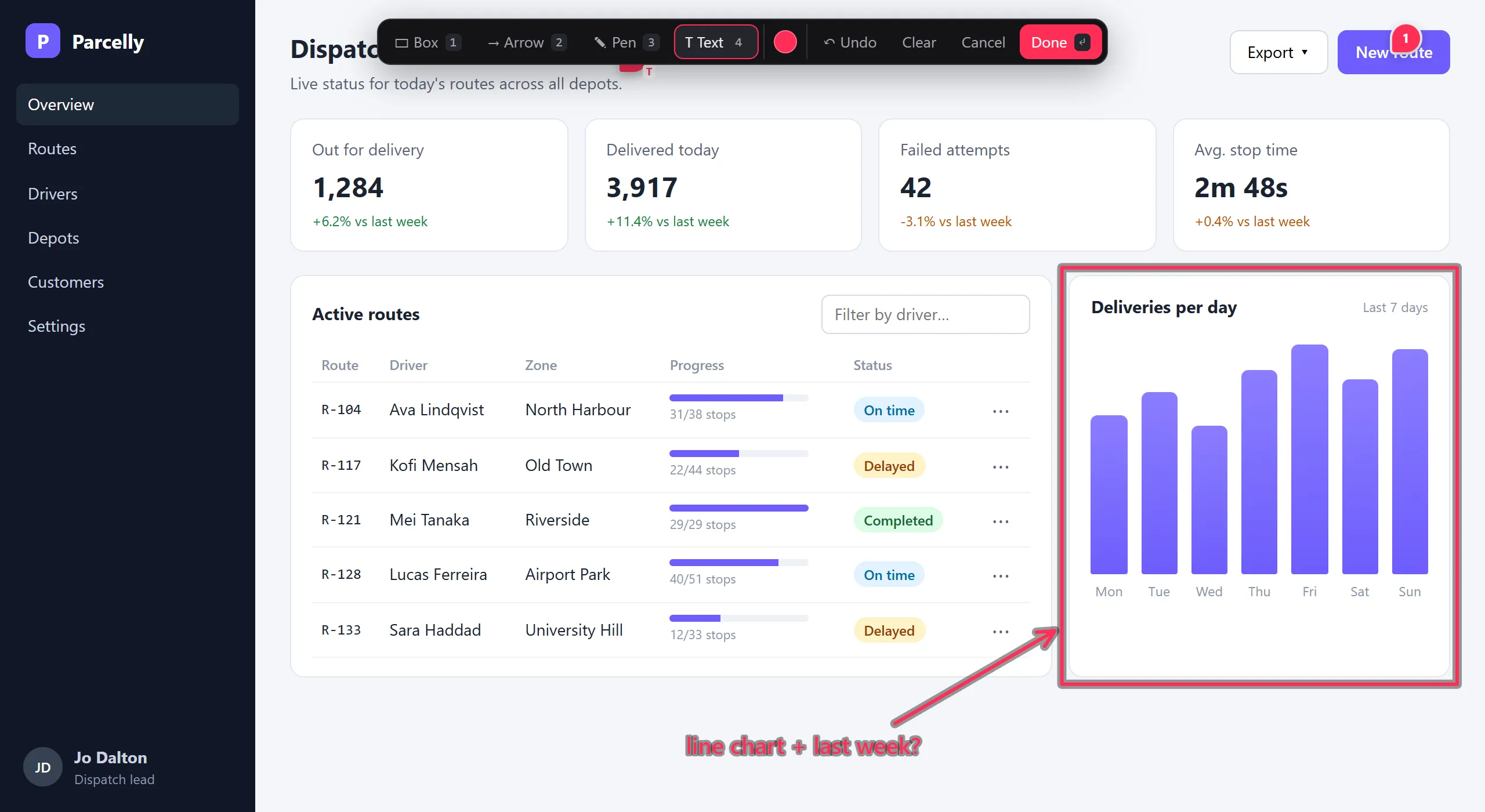
- The napkin drawing is Sketch. Boxes, arrows, freehand and labels on top of the page, for the changes that are easier to draw than to describe.
Each note can carry a label: Bug, UX, Idea or Copy, or your own. It sounds like a small thing. It is the difference between “this is broken” and “I’d like this to feel different”, which is exactly the distinction that gets lost when you dash off a chat message, and the agent reads it before anything else in the note.
Show, don’t tell
The colleague at your desk gets more than your words. They see the screen, the window size and the error in the corner. A note pinned to an element carries the same context, and much of it is things you’d never think to type:
- the source file and line, and the chain of components it sits in
- the URL, a CSS selector and the test id
- the viewport, light or dark theme, and recent console errors
- a screenshot with the element outlined
Redline saves each note as markdown in a .redline/ folder next to the code, so a note looks like this to the agent (trimmed: the full note also carries a machine-readable block with the rest of the context):
### [ ] UX · Comment · `button` "Next" · src/components/LoginForm.tsx:48
Make this full-width on mobile only.
There is no guessing which “Next” button I meant, or whether the bug only shows in dark mode at phone width. The note says so.
Nobody writes their colleague an essay about a button. They point at it.
Batch it, and keep going
The second half of the desk conversation is the colleague coming back. Redline does that too. The agent ticks each note off and writes a short reply, and the replies show up in the overlay, pinned to the element they belong to.
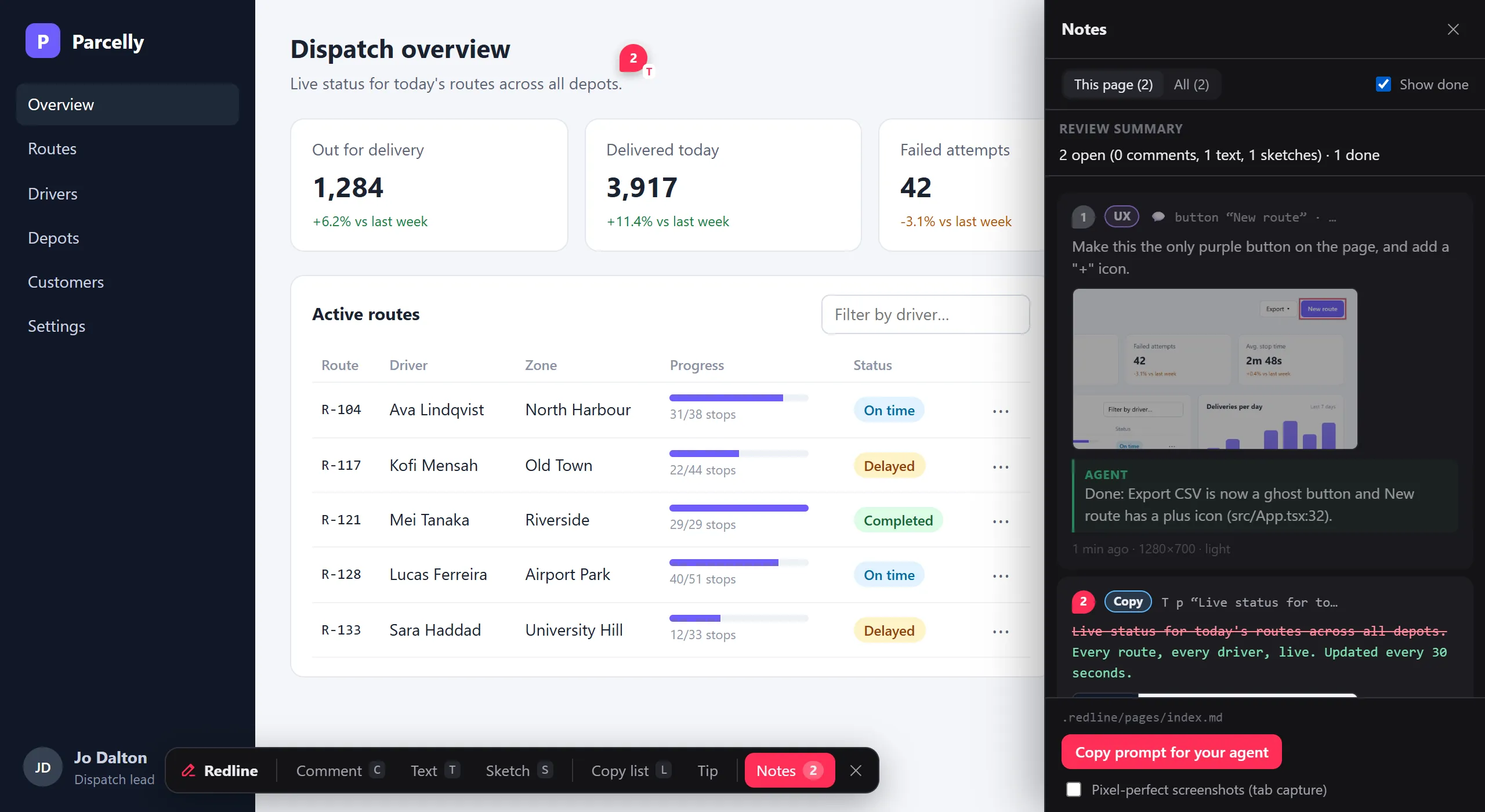
The bigger change for me has been the rhythm. I no longer stop after every finding to write a message. I click through the app as a user would and leave notes where something is off. When I have a handful, I type /redline in the agent and go straight back to the app.
The agent works through the batch in the background while I keep testing and leaving notes. Our frontends reload live as files change, so I see the fixes land on the page while I’m still on it, and the next batch is already building up. The context switch is gone: the app stays in front of me, and the agent gets every finding with full context, including that three of them touch the same component.
Not only on your own machine
The default setup is local: your dev server, your .redline/ folder, your agent. That’s where most developers will start, and it is the version you can install in two minutes.
It isn’t where it has to stop. Notes don’t have to live in the repo. Redline speaks a small, documented protocol to a note store, so the same overlay can:
- share notes across a team in dev. The repo ships with a hub, an example server that gives each person a token and gives the agent an MCP endpoint per project, so several people can review the same app from their own dev servers.
- run on a deployed site for reviewers. Editors, customers and QA give feedback on staging, or on production, behind their own login, and the notes reach the developers and their agents. Nobody else sees the overlay.
- land in your own systems. Tickets, a CMS, whatever feedback tooling you already have.
The last two are where it gets interesting on real projects. Wiring Redline into an existing platform, so feedback from editors and customers lands where the team already works instead of in one more tool, is part of what we do with our clients. It takes more than the local setup, and it depends a lot on what’s already there.
And when you don’t have the code
We’re also building AnnotateTheWeb, coming soon, which takes the same idea and drops the integration entirely. You point at any website, including ones you don’t own, with nothing to install in the codebase. That makes it close to frictionless to start.
The two fit different situations. Without the dev server there’s no source file and line and no component chain in the note, so the agent gets the page, the element and your words, and finds the code itself, which today’s agents are good at. In return you can start on any site in seconds. Redline is for when you own the code and want the agent handed the exact line; AnnotateTheWeb is for everything else.
Try it
Redline is free and open source under the MIT licence:
npm install -D @umage.ai/redline
npx redline init
Then add the plugin to your dev server. It works with React, Vue, Svelte, Solid, Preact and Astro on Vite, with Next.js 15+ and with Angular 17+, and ASP.NET Core, Blazor and Optimizely packages are on the way. Out of the box it only runs in the dev server, so nothing ships to production unless you opt in. redline init installs a guide for whichever coding agent you use (Claude Code, Codex, Cursor, Copilot, Gemini CLI and others), and an optional MCP server lets agents read and close notes as tools. Setup for each framework is on the product page and on GitHub.
And tell us what you think. It’s a feedback tool, so it would be odd not to ask for yours. Bugs, ideas and suggestions go in GitHub issues, and since it’s open source, pull requests are just as welcome.
The retro question that started this is still on our board: where are we still working like AI doesn’t exist? For UI feedback, the answer was every time we typed out what we could have pointed at.
Point instead.