

AnnotateTheWeb
Point at what's wrong on any website. Your team, or your AI agent, fixes it.
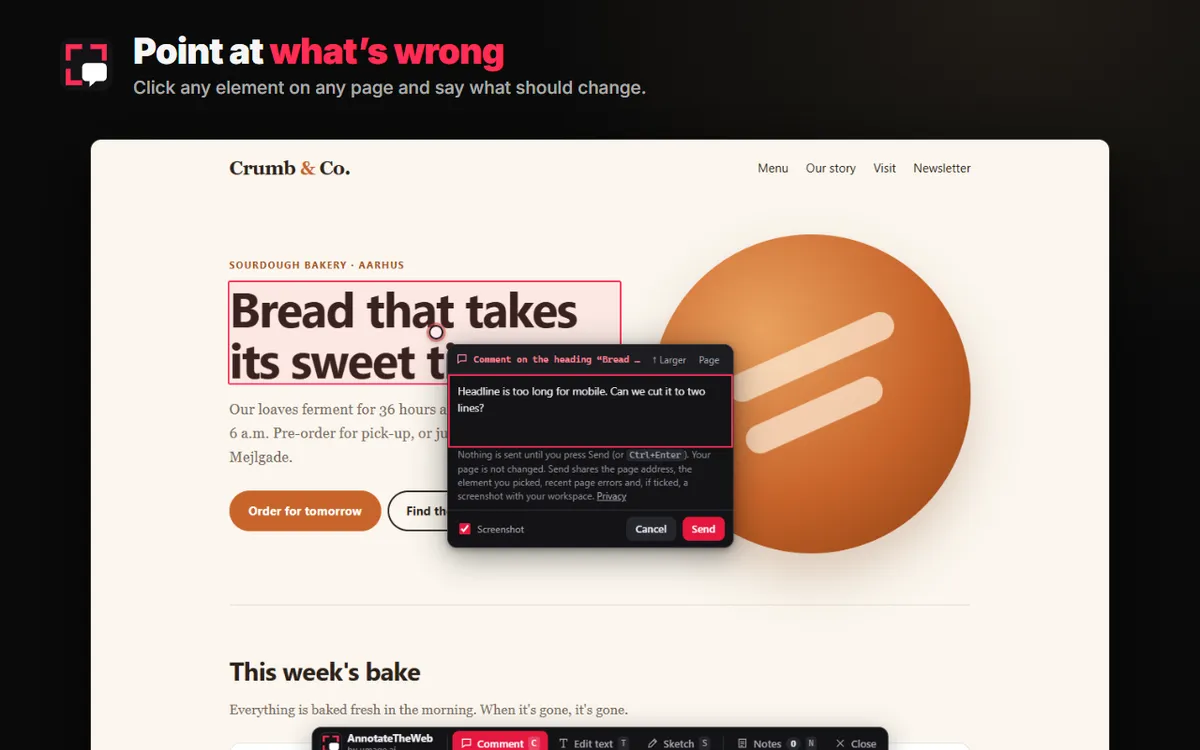
Commenting on a headline on a live site: the note names the element, and nothing is sent until you press Send
Feedback on a website rarely says where
Once a site runs somewhere, the people with the most useful feedback are editors, designers, testers and clients. They see the problem clearly, and then describe it in an email.
“The price on the shop page is wrong”
Which page, which price, which browser, and was there an error? Someone has to work it out before anyone can fix it, and an AI agent can't act on it until a person has translated it.
Screenshots lose the detail
A cropped image in Slack shows what looked wrong, not the element, the viewport, or the failed request behind it.
Reviewers shouldn't need a dev setup
Clients and content editors review staging and production, not your local build. Asking them to install tools or learn a ticket system means the small things never get reported.
Click it, say it, send it
Open AnnotateTheWeb on a page with Alt+Shift+A, the toolbar button, or the Annotate button on a site that has the snippet. Every note goes to your workspace with the detail a developer, or an agent, needs to find it.
- Comment: click any element and type what should change
- Edit text: rewrite copy in place; the note is saved as the old and the new text, an exact diff
- Sketch: draw circles, arrows and freehand on the page, with a screenshot underneath
- Works on production, staging, localhost and pages you are signed in to
- The page address and the exact element: its selector and its text
- Viewport and scroll position, and an optional screenshot
- Up to 10 recent console errors and 10 failed network requests
- A shared inbox for the team, and replies and status changes shown as pins back on the page
- An MCP server at annotatetheweb.com/mcp: agents list notes, read them with their screenshot, reply and set the status
- One command for Claude Code, and the same URL and header for any other MCP client
- Signed webhooks on every new note, change and reply, to feed your own tooling
- An agent sees only its own workspace
- A Chrome extension for any website; it does nothing until you open it on a tab
- A script snippet for sites you own: reviewers get an invite link and install nothing, and other visitors see nothing
- The overlay lives in a closed shadow root and never changes your page
- Nothing is collected until you open the overlay, and nothing is sent until you press Send
A look inside
Edit text
Click the copy, rewrite it where it stands, and send. The note holds the old and the new text, so nobody retypes it.
Sketch
When a drawing is quicker than a sentence: circles, arrows and freehand, sent with a screenshot of the page.
A shared inbox
Every note from every reviewer, filtered by website and status, with the element and the screenshot one click away.
The agent replies
An agent reads the note over MCP, fixes the code, replies in the thread and marks it done. The reviewer sees the reply on the page.
Built from Redline
AnnotateTheWeb grew out of Redline, our open-source overlay for giving AI agents feedback inside your own dev server. Redline is for the developer building the app: it runs on your machine, knows the source file and line, and writes notes as markdown next to the code.
The feedback that matters most often comes later, from people who never run your dev server. AnnotateTheWeb takes the same way of pointing at the page to any website that runs somewhere, for editors, designers, testers and clients, and sends the notes to a hosted inbox your agent can read over MCP. Same look, same popover, same way of anchoring a note to an element.
See it in 75 seconds
Or try it without installing anything on the demo bakery site.
Get started
- Create a workspace on annotatetheweb.com. It takes one click and no signup, and gives you a workspace token to share with your team.
- Open it on a page. Install the Chrome extension, press Alt+Shift+A and paste the token. Or, on a site you own, add the snippet from the dashboard and send reviewers an invite link:
<script src="https://annotatetheweb.com/att.js" data-key="att_pk_..." async></script>- Connect your agent. For Claude Code:
claude mcp add --transport http annotatetheweb https://annotatetheweb.com/mcp --header "Authorization: Bearer att_ws_..."Then ask the agent to work through the open notes.
Plans
The free plan has everything: the extension, the snippet, MCP and webhooks, room for 200 notes and 200 MB of screenshots. Notes are kept for 7 days after their last activity, and an empty free workspace is deleted after 30 days without use.
For a team that needs notes to stay, we set up a permanent workspace by arrangement: nothing expires, members sign in with a personal link, and the free-plan limits don’t apply. The server can also be self-hosted by arrangement. Get in touch and we’ll set it up.