

Editor Power Tools
A growing suite of productivity tools for Optimizely editors and admins. Audit, bulk-edit, import, and health-check your CMS — all from one place.
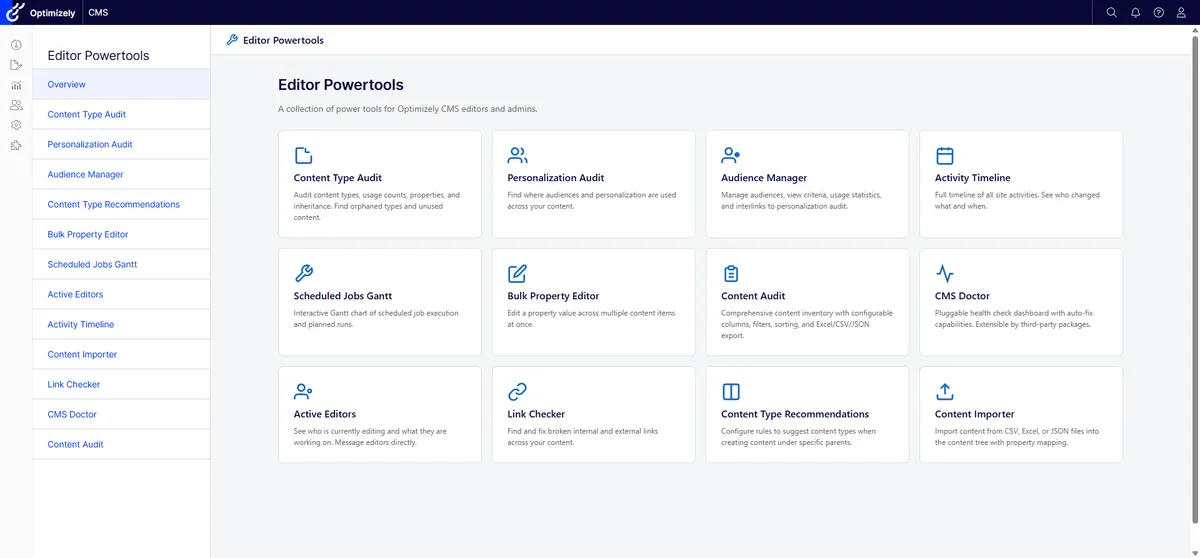
The main dashboard — all tools accessible from a single navigation menu inside Optimizely CMS
Real problems, real editors
Managing a large Optimizely installation is hard. Content grows, teams change, and the native CMS tools leave editors hunting for answers that should be instant.
Where is everything?
Editors spend hours hunting for which visitor groups are used, why a page won't publish, or what content types have broken properties. That information exists — it just isn't surfaced.
Bulk changes are painful
Updating a property across hundreds of pages, re-sorting a product catalogue, or batch-publishing seasonal content isn't possible out of the box.
Translation gaps go unnoticed
Multi-language sites accumulate stale or missing translations with no way to get a cross-site overview. Editors only find gaps when users complain.
Broken links spread silently
Internal and external links break as content moves. Without an audit tool, editors discover problems when customers do.
CMS health is a black box
Database bloat, orphaned content types, misconfigured scheduled jobs — without a health dashboard, these build up undetected.
Who's editing what?
On busy sites with distributed teams, content collisions and duplicate work are a constant risk without real-time presence awareness.
Five categories of tools
A core NuGet package plus an optional Forms add-on. No third-party UI framework dependencies. Works entirely inside the Optimizely CMS shell. New tools are added regularly.
- Content Statistics dashboard
- Activity Timeline
- Bulk Property Editor
- Content Importer (CSV / Excel / JSON)
- Content Audit
- Content Type Audit
- Personalization Audit
- Language Audit
- Security Audit
- Link Audit
- Content Type Recommendations
- Audience Manager
- CMS Doctor
- Active Editors (real-time)
- Scheduled Jobs Gantt
- Power Content Details
- Manage Children
- Visitor Group Tester
- Forms Overview
- Submissions Timeline (live)
- 4 CMS Doctor health checks
- Separate NuGet package
A look inside
Bulk Property Editor
Filter, select, and inline-edit properties across hundreds of content items. Bulk save or publish with a single click.
Content Type Audit
See every content type, usage counts, and which properties are inherited, defined, or orphaned. Export to CSV.
CMS Doctor
A pluggable health check dashboard. Run built-in checks or write your own. Auto-fix capabilities for common issues.
Activity Timeline
Full editorial history across the site. Compare versions, add comments, and track who changed what and when.
Forms Overview
An inventory of every Optimizely Form — submission counts, last activity, where each form is used, notification handlers, and retention policy. Flags duplicate fields and privacy risks.
Submissions Timeline
A cross-form, chronological feed of recent submissions, each linked back to the form that received it. Optional live mode via Server-Sent Events.
Forms checks in CMS Doctor
The Forms add-on contributes four checks to the CMS Doctor dashboard — duplicate fields, missing notification handlers, indefinitely-stored PII, and unused forms — so form health sits alongside every other check.
Built with agentic development
Editor Power Tools is a working example of how we build software at umage.ai. The entire project — from architecture to implementation — was developed using AI agents guided by our team.
Specs written in hours. Tests generated automatically. A full suite of tools shipped without a single sprint ceremony. This is what efficient, AI-native development looks like in practice.
See our Optimizely expertise →
The Content Importer in action
Bulk creation is where editors lose the most time — pasting in press releases, FAQs, or a migration’s worth of articles one item at a time. The Content Importer turns a CSV, Excel, or JSON file into content: upload, preview the rows, choose a target type and parent location, map columns to properties, then dry-run the whole thing before a single item is written.
The Forms add-on
Optimizely Forms are where a site quietly accumulates personal data — and where nobody has a single view of what’s been collected, where each form lives, or whether anyone is still reading the submissions. The Forms add-on is a separate, optional package that brings the same audit-and-monitor approach to that corner of the CMS.
It adds two tools. Forms Overview is an inventory of every Optimizely Form on the site: submission counts, last activity, field counts, where each form is referenced, which notification handlers (email or webhook) are wired up, and the retention policy in force. It flags duplicate field labels and privacy risks so the GDPR questions surface before an audit does. Submissions Timeline is a cross-form, chronological feed of recent submissions, each linked back to the form that received it, with an optional live mode over Server-Sent Events.
The add-on also contributes four checks to the CMS Doctor dashboard — Unused Forms, Forms Without Notification Handlers, PII Stored Indefinitely, and Forms With Duplicate Fields — so the health view covers forms alongside everything else.
Because it depends on the base package, install and register it after Editor Power Tools:
dotnet add package UmageAI.Optimizely.EditorPowerTools.Formspublic void ConfigureServices(IServiceCollection services)
{
services.AddEditorPowertools(/* ... */);
services.AddEditorPowertoolsForms(); // Forms add-on
}
public void Configure(IApplicationBuilder app)
{
app.UseEditorPowertools();
app.UseEditorPowertoolsForms();
app.UseEndpoints(endpoints =>
{
endpoints.MapContent();
endpoints.MapEditorPowertools();
endpoints.MapEditorPowertoolsForms(); // maps the Forms tool endpoints
});
}Install in minutes
Works with Optimizely CMS 12 (.NET 8) and CMS 13 (.NET 10). Add the package and register the middleware — that’s it.
1. Install via NuGet
dotnet add package UmageAI.Optimizely.EditorPowerTools2. Register in Startup.cs
public void ConfigureServices(IServiceCollection services)
{
    services.AddEditorPowertools(options =>
    {
        options.AuthorizedRoles = ["WebAdmins", "Administrators"];
    });
}

public void Configure(IApplicationBuilder app)
{
    app.UseEditorPowertools();
    app.UseEndpoints(endpoints =>
    {
        endpoints.MapContent();
        endpoints.MapEditorPowertools(); // Required for SignalR (Active Editors)
    });
}
Open Editor Power Tools from the CMS menu. All tools are immediately available.
Full documentation and configuration options are on GitHub.