

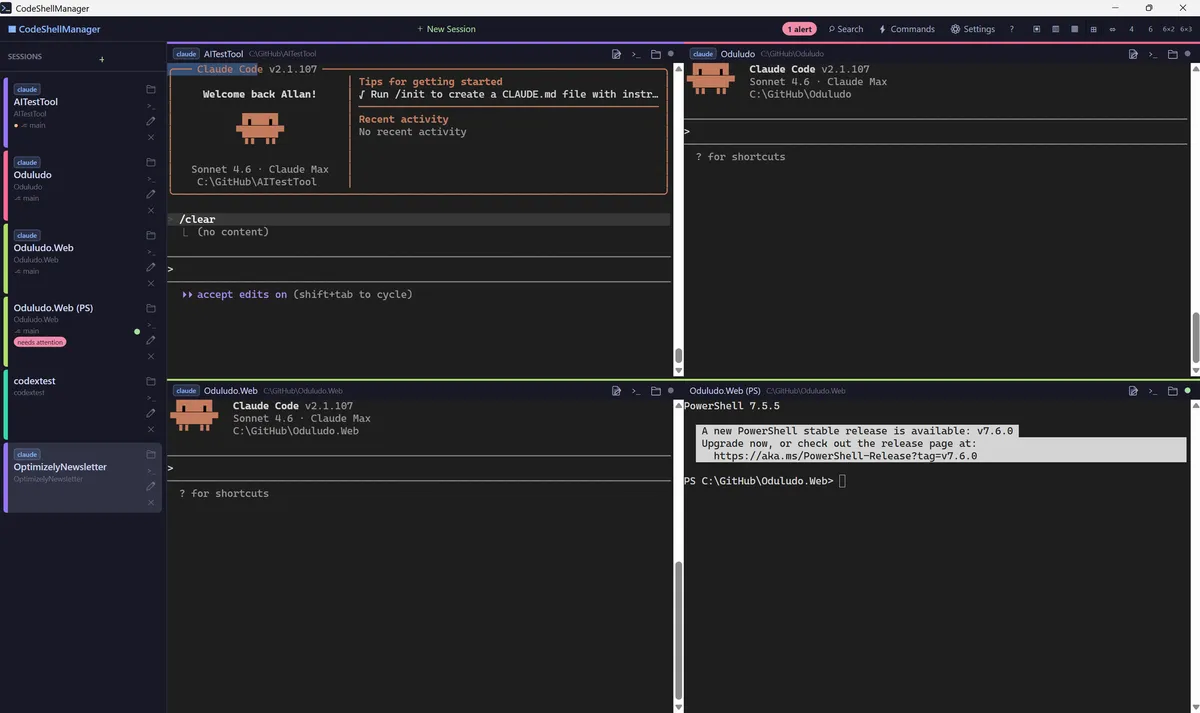
Running AI coding agents in parallel is the obvious next productivity gain. Keeping track of which terminal belongs to which project is the hidden tax — and a skill most of us are about to develop whether we notice or not.
I run several coding agents in parallel now. Usually Claude Code, sometimes a few at once on the same project, sometimes scattered across unrelated client work. It’s measurably the biggest productivity change I’ve had in a decade.
It has also introduced a problem I didn’t expect.
A few weeks ago I typed a simple request into a shell on my desktop — asking for some layout changes and a bit of content tweaking. Nothing dramatic. The shell, I thought, was running Claude Code against the umage.ai website I was working on at the time. It wasn’t. It was running against one of my own side projects — some fun-coding-idea repo I’d left open a few hours earlier.
What happened next was quietly impressive. Claude read the request, concluded the words I was using didn’t match anything in its working directory, and went looking for a project that did. It found one, outside its own folder, opened it, made the changes, and then politely pointed out that I’d been talking to the wrong Claude.
I’d like to say this was a one-off. It wasn’t. The shells on my desktop had multiplied. I could tell you roughly what each one was doing, but not always at a glance. More than once I’d wandered between windows asking one agent for something another should have heard.
I’d built myself a new problem. And “just pay more attention” clearly wasn’t going to be the fix.
Running more agents isn’t free
When people talk about the productivity gains of AI coding agents, they usually stop at “one developer does the work of several.” That’s true, but it misses the second-order effect. If the bottleneck stops being the typing, the obvious move is to run more agents in parallel — on different tasks, different branches, different projects entirely.
That’s where the productivity curve bends again. And that’s where the meta-work starts: the work of knowing which agent is doing what, where it is, and whether it needs you.
Every additional shell is a context you might lose.
What I actually needed
I started with the usual tricks. Colour-coded prompts. Naming conventions in Windows Terminal tabs. A sticky note or two, which felt like defeat.
None of it scaled past about four or five agents. By eight or nine I was opening the wrong window several times a day. By twelve I was hunting through my taskbar like someone searching for a lost pen.
What I actually wanted was embarrassingly obvious once I wrote it down:
- One window with everything in it, in a layout that fits my screen.
- Shells named automatically after the project they’re working in, with a colour I didn’t have to choose.
- A signal when an agent was waiting for me, so I wouldn’t miss five minutes here, twenty there.
- A way to search across what all the agents had said today, because I’d already lost too many useful paragraphs to scrollback.
- And it all needed to come back the way I left it when I reopened the laptop.
That isn’t a terminal. That’s something closer to mission control for agents.
So I built it
Over an evening and a couple of hours the next day I built CodeShellManager, a Windows desktop app that hosts any number of command-line tools — Claude Code, PowerShell, SSH sessions, whatever you want — in a single organised window. 26 hours from idea to launched open-source product, built largely by the agents themselves, which felt appropriate.
It holds up to eighteen shells at once across nine grid layouts, and names and colour-codes each session automatically by the project folder it’s running in, so the “which one is this” problem mostly stops happening.
A full-text search index covers every line of terminal output, so I can find something an agent said three hours ago in any session. A small alert watcher notices when Claude Code pauses for input or approval — green, orange, pink, depending on what it wants — so I don’t leave agents idle while I’m focused on another one.
Sessions survive reboots, and each one shows its git branch and dirty-state at a glance.
None of these features are clever on their own. The value is in having them in the same place.
When you’re orchestrating five Claudes, the tool that matters isn’t the model. It’s the thing that stops you talking to the wrong one.
I know what you’re going to say
Why didn’t you just use [product X]? Honestly, maybe I could have. Windows Terminal, tmux, WezTerm — there are plenty of tools in the rough vicinity, and some of them would have taken me 80% of the way.
But with the speed of agentic development, sometimes building a bespoke tool that perfectly fits your needs is cheaper than accepting the limitations of something that almost does. That calculation has shifted quite a lot in the last year. Building your own tool used to be extravagant. Now it’s often a long weekend.
CodeShellManager is open source and free. Use it as-is, fork it, extend it, or — probably most useful — take the idea and build your own version that fits your workflow better.
The point is the skill, not the app
If you take one thing from this, don’t let it be the tool. Let it be the observation.
Running agents in parallel is the obvious next productivity multiplier, but the friction shifts from “can the agent write the code” to “can you keep track of what eighteen of them are doing at once.” That’s a skill. Call it shell hygiene, call it agent ops, call it whatever — most of us are going to develop it whether we notice or not.
I’d rather notice.