

Graph Search Tools
Marketer-facing search tools — pinned results, synonyms, and search analytics — back on top of Optimizely Graph.
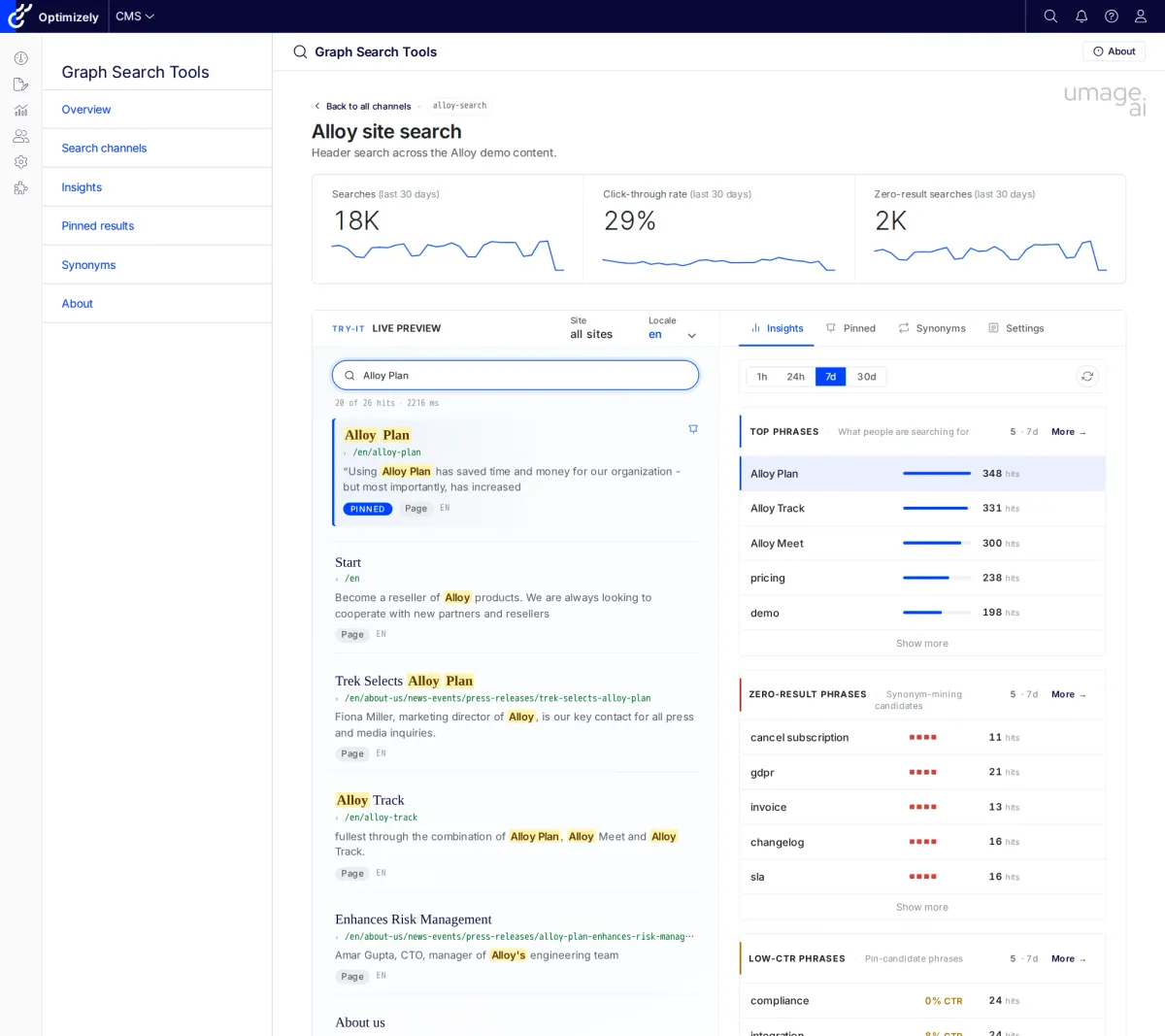
Channel detail page — KPI strip, Try-it live preview running the production GraphQL document, and Insights / Pinned / Synonyms tabs in one view
The operator surface Graph didn't ship with
Optimizely Graph is a better retrieval engine than Search & Navigation — but it didn't ship with the marketer-facing tools that made Search & Navigation usable in the first place. Graph Search Tools fills that gap.
No view of what users search for
Graph doesn't surface query logs in the CMS. Without a built-in dashboard, marketers can't see the phrases users are typing — let alone the ones coming back empty.
Bestsellers don't surface for the obvious queries
The algorithm gets the ranking technically right and commercially wrong. Without first-class pinning, the launch product stays buried and the campaign page doesn't make the first page.
Pinning means raw API calls
Graph supports pinned results, but only through the API. There's no first-party editor in the CMS shell, no per-channel scope, and nothing to stop a pin from disappearing into a tenant-global collection nobody reads.
Synonym gaps go unnoticed
Multi-locale sites accumulate stale, duplicate, or missing synonyms with no overview. Editors only find the gap when a customer searches 'trainers' and gets nothing.
Zero-result and low-CTR are invisible
On a healthy site, less than 5% of queries return zero results. Most sites that haven't tuned theirs are running 10–20%. Without a dashboard, every one of those failed sessions is silent.
Try-before-deploy eats half a day
Verifying that a pin or synonym actually fires in the live query usually means asking a developer to redeploy a test environment. By the time the answer lands, the campaign window has moved.
Four feature areas
Installed as a single NuGet package. Lives inside the CMS shell as a top-level Graph Search Tools menu. Works against any Graph tenant the host can reach — no dependency on the CMS-side content-sync packages.
- Top phrases, zero-result candidates, low-CTR phrases
- Filter by channel and locale, 24h / 7d / 30d window
- Cross-channel dashboard and per-channel detail share the same window set
- Data from a self-contained DDS sink — no external pipeline
- Tenant-wide pin browser with Pins / Collections / Changelog tabs
- Pins scoped to the channel's pinned-collection key — guaranteed to fire in the live query
- Hits, CTR, and zero-result columns inline so you spot coverage holes
- Filter by collection or locale; jump to the owning channel with one click
- Replacement and equivalent rules per locale
- Tenant-global pool — channel-agnostic by design
- Last-30-days activity column flags unused rules
- Full changelog of every create / update / delete sent to Graph
- Developer-registered channels declare the GraphQL document and pinned-collection key the frontend actually uses
- Try-it preview runs the production GraphQL document — no redeploy required
- KPI strip (searches / CTR / zero-result) per channel
- Zero-config fallback: a synthesised Generic channel for tenants that haven't registered any
A look inside
Insights
Cross-channel dashboard for what users are actually searching for. Top phrases, zero-result candidates, and low-CTR phrases — filterable by channel, locale, and a 24-hour, 7-day, or 30-day window.
Pinned results
Tenant-wide pin browser. One row per (phrase, collection, locale) with the resolved channel link, item count, hits, CTR, and zero-result columns inline.
Synonyms
Replacement and equivalent rules per locale, with last-30-days activity and a full changelog. Synonyms live in a tenant-global pool in Graph, so this surface is channel-agnostic by design.
Channel detail & Try-it
Each registered channel gets a detail page with a KPI strip and a Try-it preview that runs the same GraphQL document the production frontend fires. Change a pin, type the query, watch the result move.
Built in production
Graph Search Tools started inside a Nordic industrial customer’s migration from Elastic to Optimizely Graph. The marketer-facing tools that Search & Navigation used to provide weren’t there in Graph, and the customer needed them before go-live. We built the addon for that project and decided to open-source it — the gap is the same on every Graph migration we’ve seen.
See our Optimizely expertise →
Install in minutes
Works with Optimizely CMS 12 (.NET 8) and CMS 13 (.NET 10). Add the package, register your search channels, and the menu appears in the CMS shell.
1. Install via NuGet
dotnet add package UmageAI.Optimizely.GraphSearchTools2. Register your channels in Startup.cs
A channel is one search surface on your site (header search, product listing, knowledge base) declared with the same GraphQL document and pinned-collection key your frontend actually uses:
services.AddGraphSearchtools()
    .AddSearchChannel("alloy-search", p => p
        .DisplayName("Alloy site search")
        .LocalesFromCmsLanguages()
        .SearchedFields("Name", "MetaDescription", "MainBody")
        .UsesPinnedKey("alloy-{locale}")
        .GraphQLDocumentInline(AlloySearchService.SampleHitsQueryDocument));
Open Graph Search Tools from the CMS menu — all six tools are immediately available. When no channels are registered the addon synthesises a single Generic channel so zero-config installs keep working.
Full configuration reference, channel builder API, and contribution guidelines are on GitHub.