
Long-running content management systems accumulate problems that never throw exceptions. The Editor Power Tools audit family is six lenses on what your CMS hides — what's quietly broken, and what a planned change is about to touch.
Every long-running Optimizely installation I’ve ever walked into has at least one content type called something like TeaserBlockRightImageNEW2. The name already tells you what happened. A campaign needed something slightly different, a developer didn’t realise there was already a type that would have worked, and the easiest path was to add a new one. Repeat that across five years and a couple of platform upgrades, and the create-content dialog becomes a wall of options nobody fully trusts.
Underneath the names, the shape is always the same. Ten or twenty blocks and two or three page types do ninety percent of the work. Then a long tail of sixty, a hundred, sometimes a hundred and fifty more — used once, used twice, kept around because nobody is sure whether anything still depends on them. Editors live with all of it.
The reason it stays this way isn’t laziness. It’s that the people who could clean it up can’t see it clearly enough to act. Developers see exceptions in logs and tickets in their queue. Editors see friction every day that doesn’t show up in either place. The audit family in Editor Power Tools exists to close that gap — six lenses on the kind of CMS rot that otherwise has no instrumentation surface.
The Content Type Audit, both halves
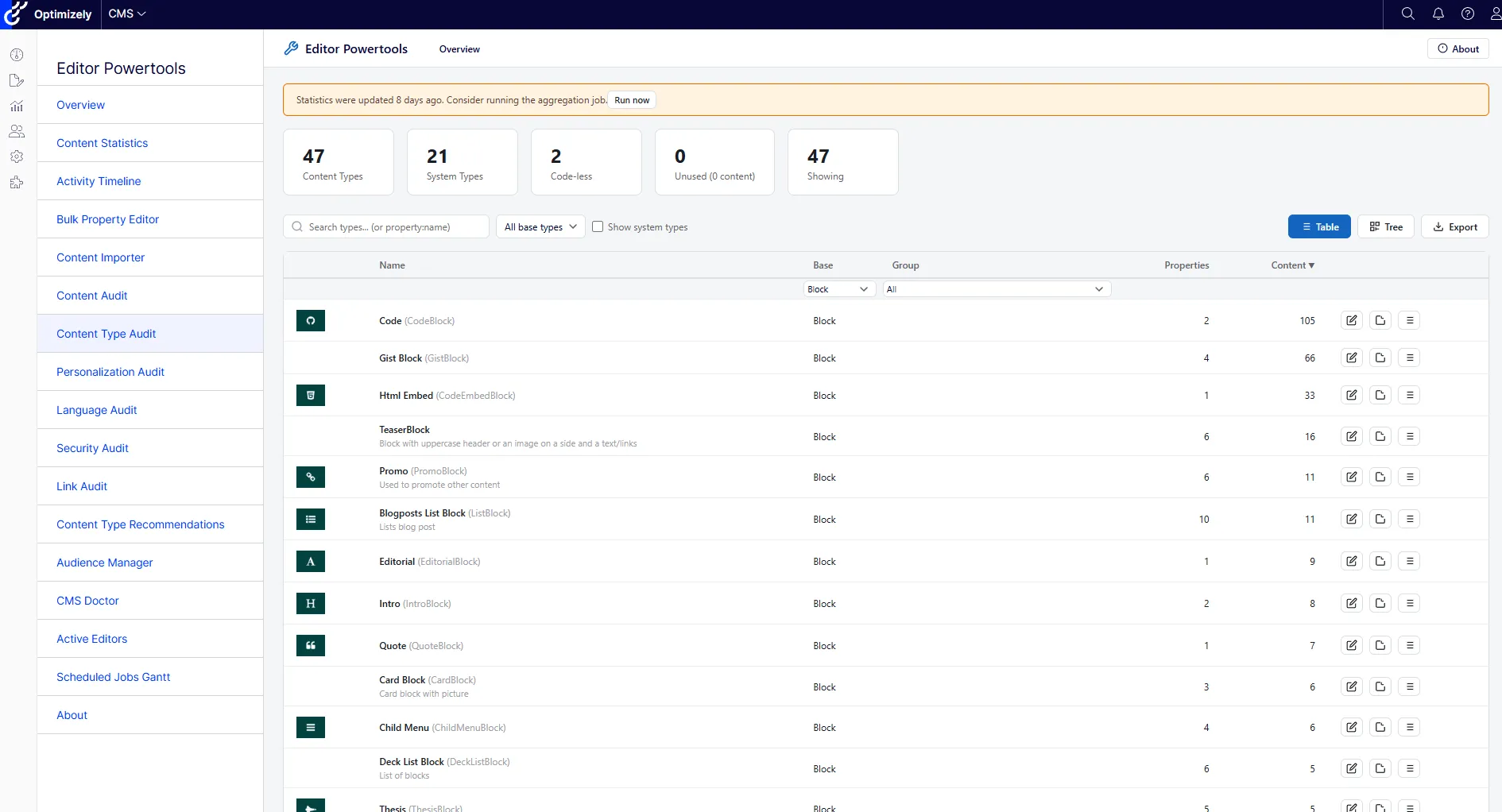
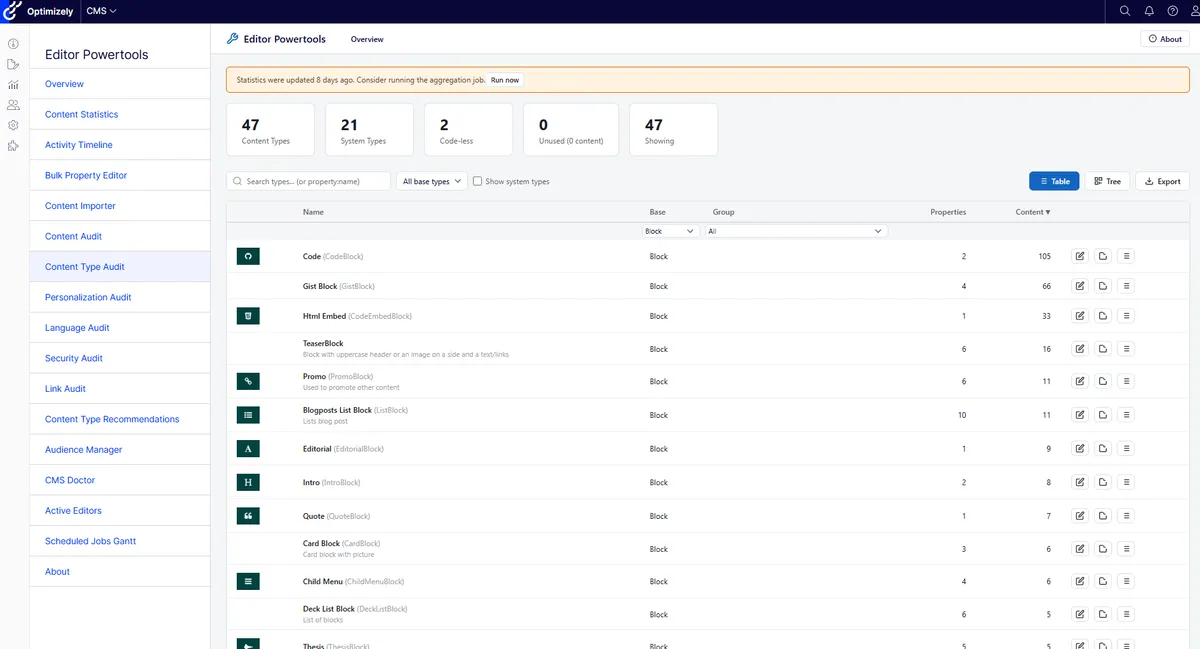
The first audit, and the one I run on day one of every engagement, is the Content Type Audit. It walks the entire CMS, lists every content type, and tells you who’s using it and how. The header tiles do most of the framing on their own: how many real content types versus system types, how many have lost their .NET class entirely (the Code-less count — types where the code shipped, shipped again, then got refactored away two upgrades ago and the type definition never got removed), and how many have zero content using them.
Before you click into any row, the totals themselves are a tell. A small, well-tended site sits in the thirty-to-fifty range of actual content types. A real long-running enterprise site is usually north of eighty. Past a hundred and fifty and the question isn’t whether there’s content-model debt — it’s how much, and where. The count on its own isn’t a verdict, since there are sites that legitimately need a lot of types, but combined with the names it usually is. Once you start scrolling and seeing Old, NEW, NEW2, V2, Final, Temp, or any abbreviation that only the developer who left in 2022 could decode, the audit has told you most of what you needed to know before you’ve drilled into a single row.
But the more useful work is in the rows. Each type gets a usage count, and a click drills into the actual content items that exist of that type, with reference counts attached. That second view is where the audit’s other job lives.
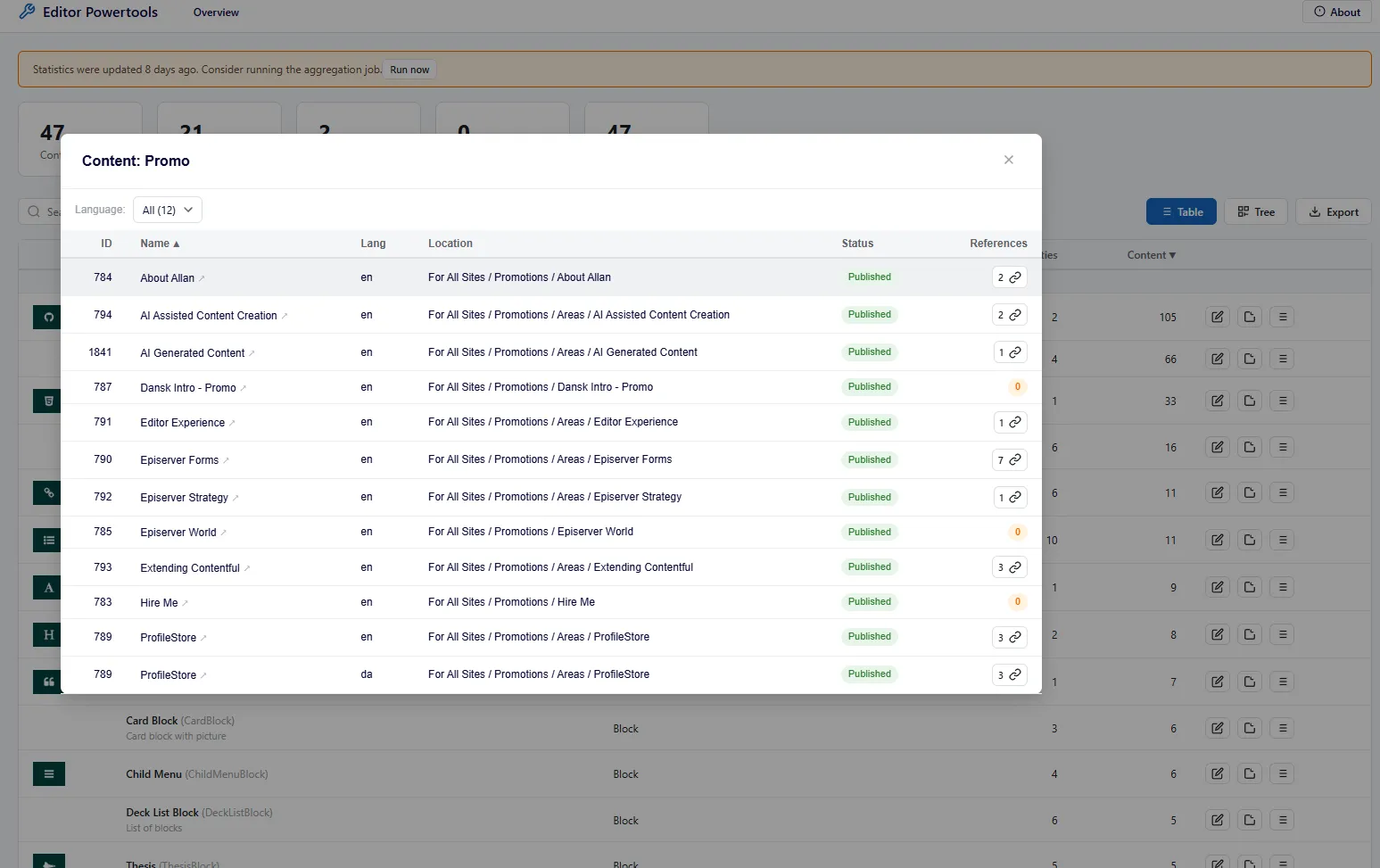
Here’s what I mean. The first time you run this on a site that’s been live for a few years, the obvious finds come first: types nobody uses anymore, types where the .NET class is gone, types you didn’t know still existed. Useful, satisfying, all of that. The less expected finding is one tier down. A content type that’s used on, say, ten or twelve blocks, where several of those blocks themselves aren’t referenced from any page. Live in the database, gone from the actual site. Cascading orphans. The reference column above is what makes them visible — and on a real engagement you sometimes find an entire type where every instance is in this state.
That’s the rot-finding job. The other job comes up when you’re not cleaning anything — you’re planning.
When a designer says “we want to change how this teaser block looks across the site,” the implicit question is: where will that change land? On twelve pages, or twelve hundred? Concentrated in one section, or scattered everywhere? You can grep through the code, sort of, but a usage map across the actual published content tree is what you actually want. The same drill-down view is that map. Same audit, different question.
The audit doesn’t decide what to do. It just lets you stop guessing about the surface area.
Two questions a CMS won’t answer for you
That’s the pattern, and it repeats. Every audit in the family does one or both of two jobs:
- What’s quietly broken? Things that work well enough that nothing throws an exception, but cost editors time or trust every day. Orphans. Stale states. Permissions that drifted. Translations that fell behind.
- What will this change touch? The blast radius before you act. Where a block lives. Which pages a visitor group customises. Which content depends on a language definition you’re about to change.
The CMS doesn’t give you either of these out of the box. Not because the data isn’t there. It is, all of it. The problem is that nobody built the read view, because the people who need it most aren’t the ones who can build it. The audits are that read view.
Personalization — the visitor groups, and what they actually touch
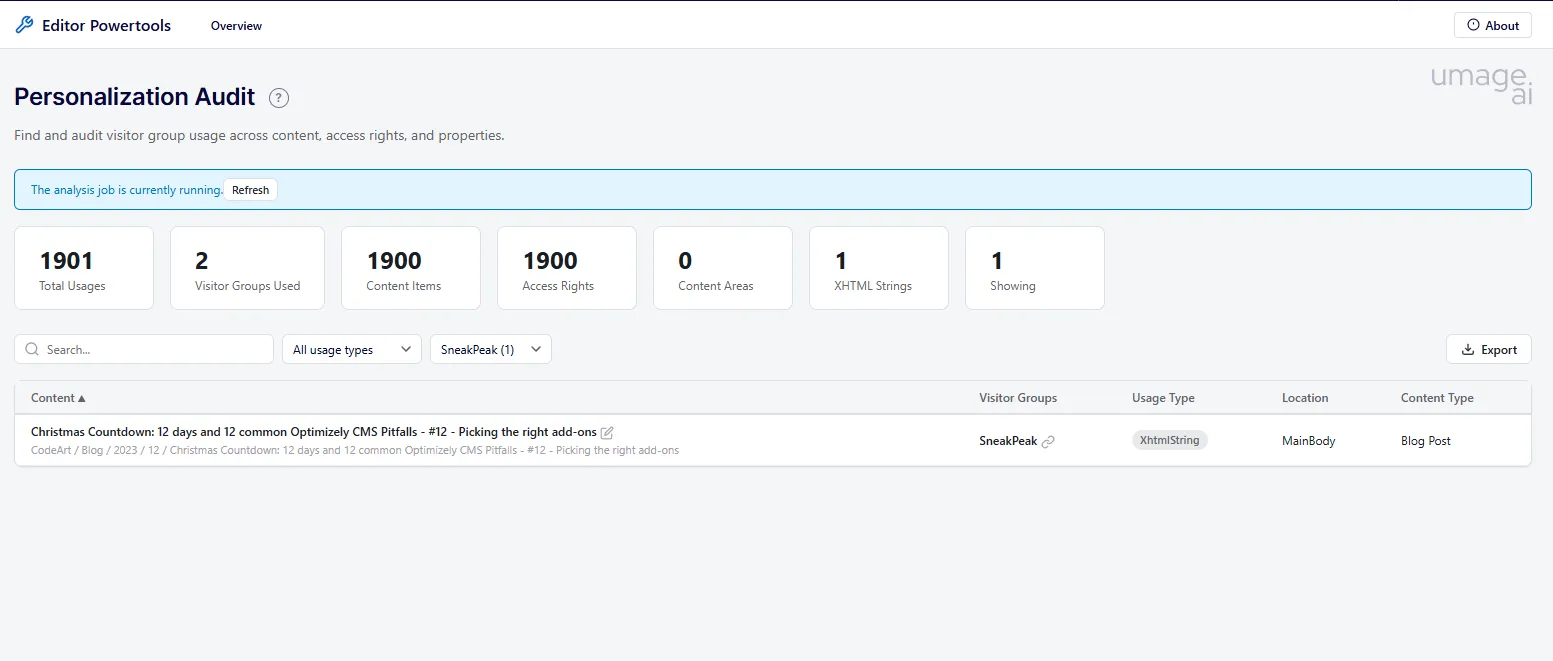
The Personalization Audit is the dual frame in its purest form. The header tiles tell you total visitor-group usages across the site, how many distinct groups are actually in use, and where those usages live: content items, access rights, content areas, XHTML strings. On a real site, the disparity between visitor groups defined in admin and visitor groups actually used somewhere is usually the first surprise.
The rot half is straightforward: orphan visitor groups, defined years ago, wired up to nothing. They sit there.
The blast-radius half is the one that changes how teams work. When someone wants to modify a visitor group definition (tighten the criteria, retire it, migrate it to a new segmentation model), the immediate question is: what does this currently do? Filter by the group and the audit gives you every page, every access rule, every content area, every XHTML snippet personalised on it. With that list in hand, modifying the group becomes a planned change instead of a held breath.
Language — what you’ve actually got, and what’s drifted
The Language Audit’s job depends on the site. On a single-language site it tells you very little. On a site with five, eight, twelve locales, it’s how you keep editors honest with each other.
Two questions it answers that the CMS doesn’t surface anywhere else. First: how much content do you actually have in each language? Often less than the org chart implies. The German site that “exists” turns out to have three pages localised and the rest falling back. The Norwegian content was current eighteen months ago and hasn’t been touched since.
Second, and more useful: which pages have drifted? When the English source updates and the translations don’t, that delta is invisible until someone reports it — usually a customer, usually angrily. The audit makes the staleness legible before the customer does.
Security — the permissions someone changed and forgot
Almost every long-running site has at least one access boundary nobody can remember setting. A page where Everyone got removed because of one incident and never restored. A folder where a colleague granted access to someone who left two years ago. A content area where custom permissions override the parent’s and nobody is sure why.
The Security Audit is the inventory you need before you can decide what’s intentional and what’s residue. Filter by role, by content item, or by permission type, and the audit tells you exactly where each access decision lives. The interesting findings are almost always the ones you didn’t go looking for: the access set as a workaround for a bug that got fixed eighteen months ago, the role still scoped to a section that no longer exists, the custom permission applied during a launch and never tidied up.
For editors, this is the audit that resolves “why can’t I edit this page?” tickets without a developer in the loop.
Content — the inventory you can take into Excel
The Content Audit does for content items what the Content Type Audit does for types: a full inventory with filters by status, locale, last-modified, and reference count. On its own that’s useful. Published-but-unreferenced content surfaces quickly, language gaps become visible at the item level, and the items consuming search-result space without being linked from anywhere finally have somewhere to be looked at.
The feature that earns the audit most of its real use isn’t the browse view, though. It’s the export.
Every audit in the family has an export button, but Content is where it stops feeling like a developer feature and starts feeling like a content-strategy feature. Once the inventory is in a spreadsheet, the people who can actually do useful work with it (content leads, marketing managers, editorial planners) can slice it, pivot it, share it, and walk into a meeting with their own filtered list. The audit’s job in the CMS shell is to make the data legible. The export’s job is to take that legibility to where the conversations actually happen.
A lot of editorial decisions stop being abstract once they’re on a sheet. Which sections have stale content. Which authors haven’t published in a year. Which languages are dragging on coverage. Which content types are nostalgically kept around but never instantiated. None of that is new information — it was all in the CMS the whole time. The audit and the export are what make it talk-about-able.
Link — the broken-things audit nobody runs in time
The Link Audit walks internal and external links across the site and reports what’s broken or redirecting. Editors usually know they have broken links; the audit tells them how many, where, and trending which way. It’s the audit most likely to get run twice a year, around content-cleanup quarters, and that’s fine — it’s that kind of tool, and the value is having it ready when you finally decide to look.
What to do with the findings
The two halves of the audit family have different next steps.
For the rot-finding half, the audit is the inventory; the cleanup is the work. Bulk-editing, mass property updates, content migration, retiring types — that’s the topic of the next post in this series. Visibility on its own doesn’t fix anything; it just makes the right work visible.
For the blast-radius half, the next step is usually a conversation. Designer wants to change a block? Pull the usage list. Marketing wants to retire a visitor group? Pull the customisation list. Legal wants to know which folders restrict access? Pull the permission list. The audit doesn’t change the decision; it changes whether the decision is informed.
Six audits, two questions. Run them on a site that’s been live more than two years and the first run is always a little uncomfortable. The point is the second run, six months later, when there’s less to find.
Try them
The audits ship in Editor Power Tools, the open-source Optimizely CMS 12 and 13 add-on I wrote about in the launch post. MIT licensed, one NuGet package, multi-targeted across both CMS majors. Install, register the middleware, and the audit family is in the menu — no extra configuration.
If you’ve been inside a long-running Optimizely site long enough to have an opinion about which of these audits you’d reach for first, I’d genuinely like to hear it — open an issue or a PR. And if your CMS has reached the stage where this list reads more daunting than interesting, Optimizely is what we do, and an upgrade engagement usually starts exactly here: with a clean read on what’s actually in the box.