

Editorial work arrives in batches — a product rename across two hundred support articles, five hundred FAQs that should become blocks, an SEO refresh across a whole section. The productivity group in Editor Power Tools exists for exactly that: bulk editing, bulk import, and the views that keep a site's operational rhythm visible.
Sooner or later, every organisation renames something. A product, a service line, occasionally the whole company. Marketing sends the email, the new name is official from Monday, and somewhere down the chain an editor inherits the part nobody put on a slide: the old name sits in the title of every support article, and there are two hundred of them.
The CMS has an answer for this, technically. Open the page, change the title, publish. Repeat. Optimizely’s edit view is genuinely good at that single page — properties laid out sensibly, validation, versioning, the lot. The problem is that nobody scoped the work as “one page”. The work is a batch. The tool is a loop.
I ended the audits post by saying the audit is the inventory and the cleanup is the work. This post is about the work: the productivity group in Editor Power Tools — bulk editing, bulk import, and the two views that keep the day-to-day rhythm of a site visible.
The one-at-a-time tax
Once you start looking for batch-shaped work, it’s everywhere. The product rename above. Refreshing SEO keyword tags across the pages you’re actually pushing this quarter, because the ones in there reflect what you were pushing two years ago. Batch-publishing seasonal content. Retiring the long tail of items an audit just surfaced.
The CMS edits one item at a time. The work almost never arrives that way.
On real teams this resolves in one of two ways, and both are bad. Either the work gets postponed — which is how content debt compounds — or it gets handed to a developer, who writes a one-off script against the content API. I’ve written plenty of those scripts. They work. They’re also throwaway code with publish side effects, written by the person furthest from the content, reviewed by nobody, and run exactly once in production. That’s not a process; that’s a dare.
Bulk Property Editor — mass edits without the script
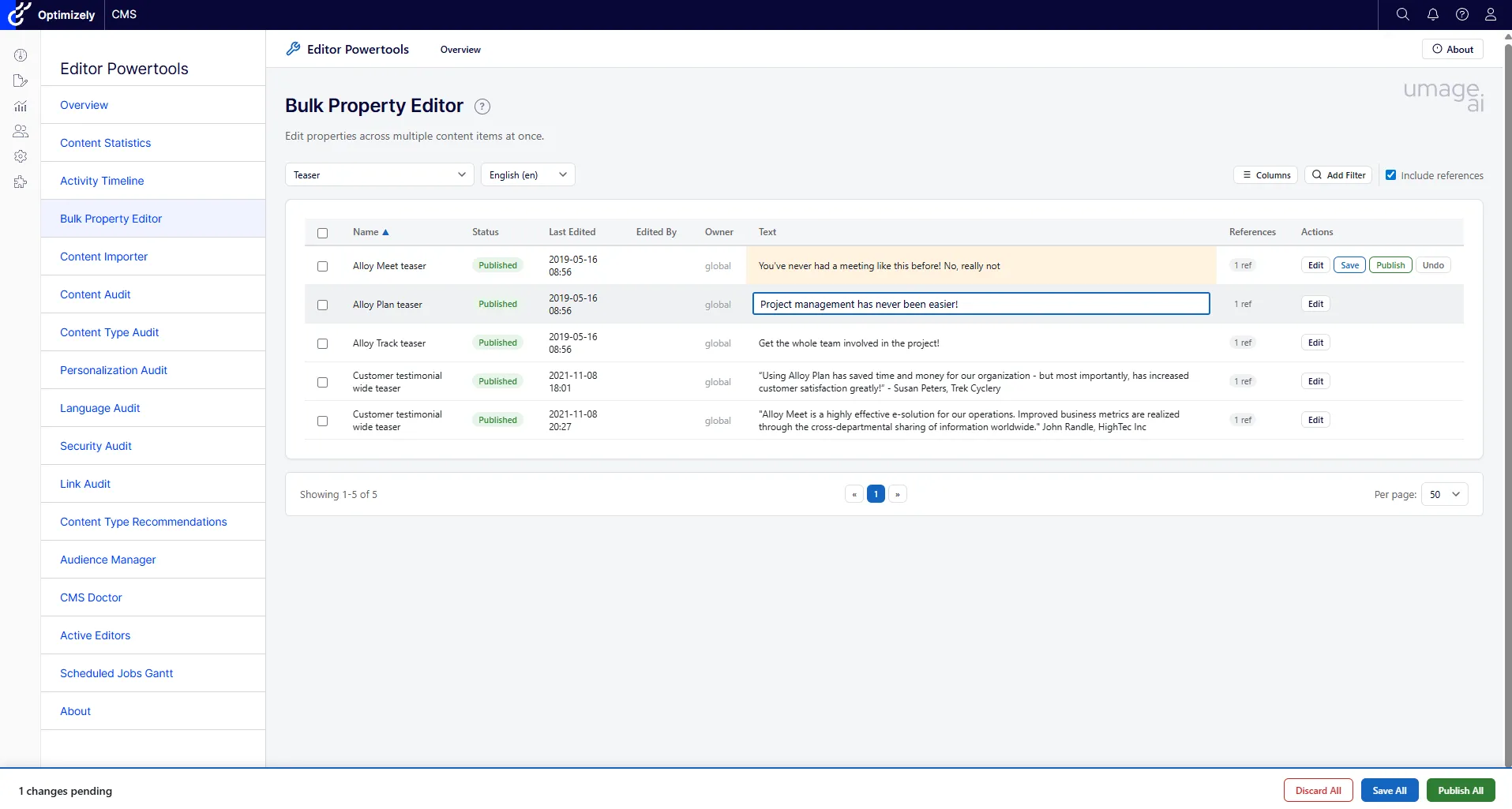
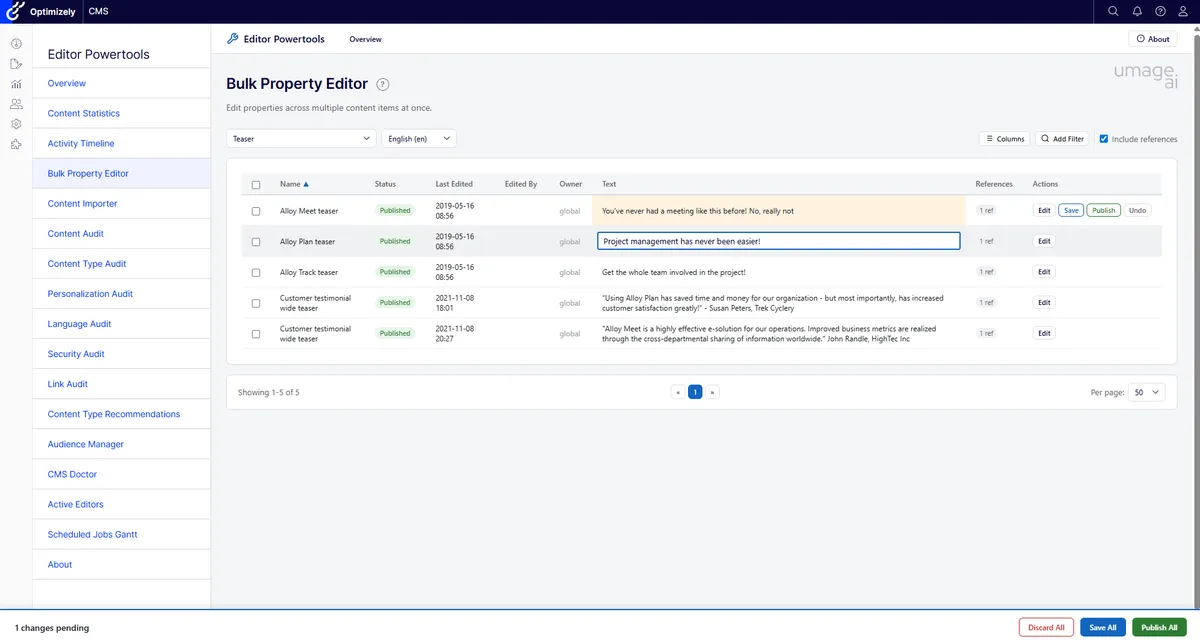
The Bulk Property Editor is the spreadsheet view the CMS never had. Filter down to the content you mean, see the properties as a grid, edit the cells inline, then save or publish the lot in one operation. Sorting and pagination keep it usable when “the lot” is several hundred items.
The product rename becomes: filter to the support section, sort by title, fix the titles, bulk publish. The keyword refresh becomes the same move on a different column. What was a half-day of clicking — or a nervous afternoon of script-writing — is a focused twenty minutes, done by the editor who actually understands the content.
One thing worth saying plainly: a bulk publish is a real publish. Two hundred rows saved is two hundred new versions live. The grid shows you exactly what you’re about to touch before you commit, which regular readers will recognise as the blast-radius question from the audits post — answered here at the moment it matters most.
Content Importer — when the content exists, just not here
The other half of the bulk story isn’t editing content you have; it’s creating content you’ve been given. The support team hands over five hundred FAQs that should become reusable blocks across the site. Or you’re consolidating platforms, and another system’s worth of blog posts needs to land in Optimizely with titles, dates, authors, and bodies intact. Nobody’s job description says “copy-paste five hundred times”, but on most teams somebody ends up doing it — or the content simply never makes it in.
The Content Importer takes CSV, Excel, or JSON and turns rows into content items. You map source fields to content properties, preview what’s about to be created, and validation catches the rows that won’t survive contact with your content model before anything is written.
The feature I’d argue matters most is the dry-run mode. Anyone who has run a content migration knows the specific feeling of pressing the button and hoping. A dry run is the rehearsal: the full import, executed end to end, persisting nothing. You read the result, fix the mapping, run it again. When the real import finally runs, it’s the third or fourth time you’ve seen the outcome — which is exactly how boring a migration should be.
Manage Child Items — when the batch is “everything under here”
Not every batch is a filtered query across the whole site. Sometimes the unit of work is a single parent and all its children: a news landing page with two years of articles under it, a campaign hub whose children all expire the same Monday, a product category being retired. You don’t want to find these items — you know exactly where they are. You want to act on them together.
Optimizely’s content tree lets you do that one node at a time. Manage Child Items gives you the whole set at once: every child of a page in a single list, select all of them or just some, and publish, unpublish, or delete the selection in one action.
It’s the same principle as the Bulk Property Editor, scoped to a parent instead of a filter. The page tree stops being something you click through node by node and becomes something you operate on. And the same honest caveat applies: a bulk unpublish or delete does exactly what it says to everything you’ve ticked, so the selection step is the one to slow down on.
Productivity is also knowing what’s going on
Batches are half the story. The other half of keeping editors productive is less glamorous: knowing what’s happening on the site without having to ask around.
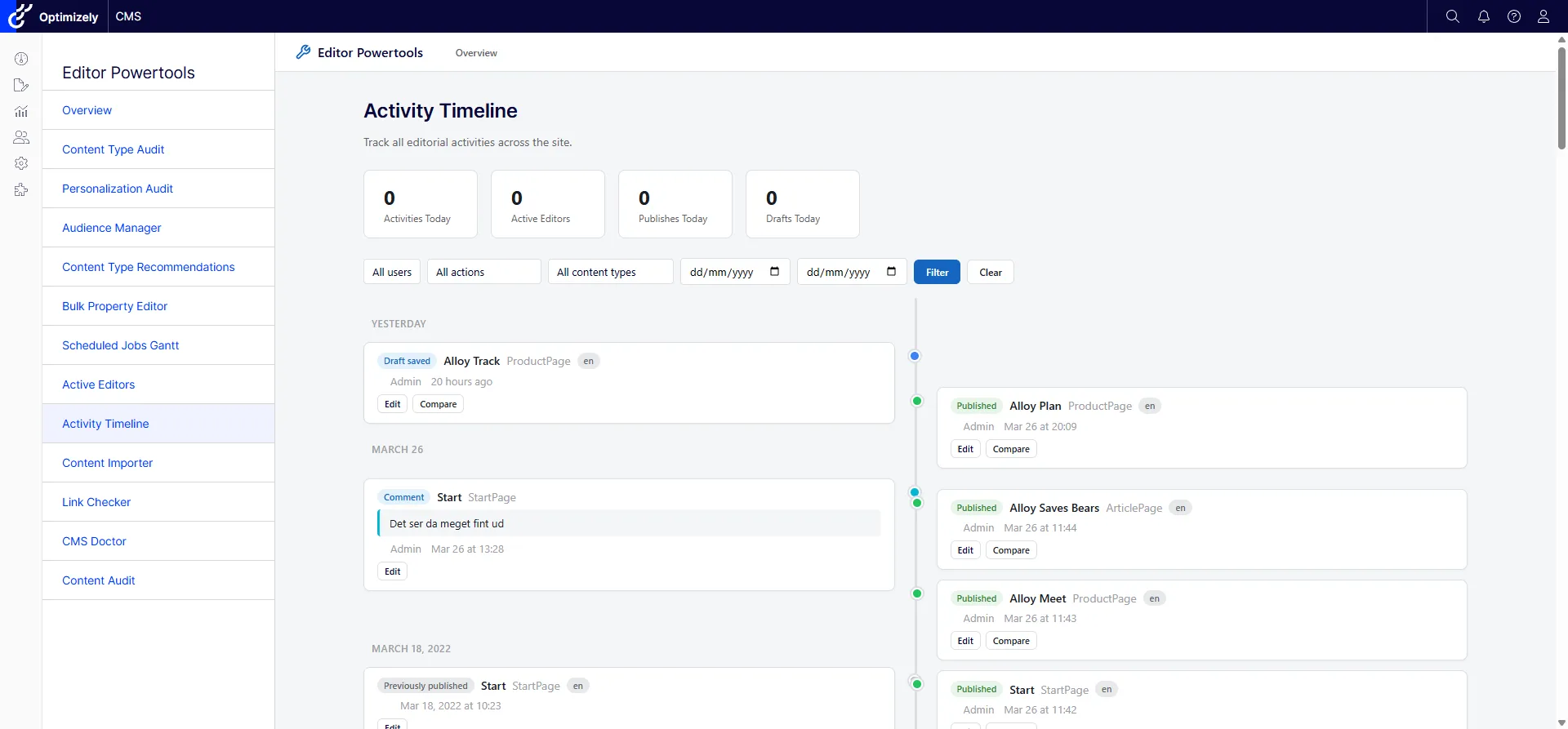
The Activity Timeline is the Monday-morning view: a timeline of editorial activity across the whole site — who changed what, and when — with version comparison and comments attached. On a site with one editor it’s a nicety. On a site with a distributed team, it’s how you find out what happened last week without a meeting, and how you trace the change when a page suddenly looks wrong. The infinite scroll means the history doesn’t stop at the bottom of the first screen, which matters more often than you’d think.
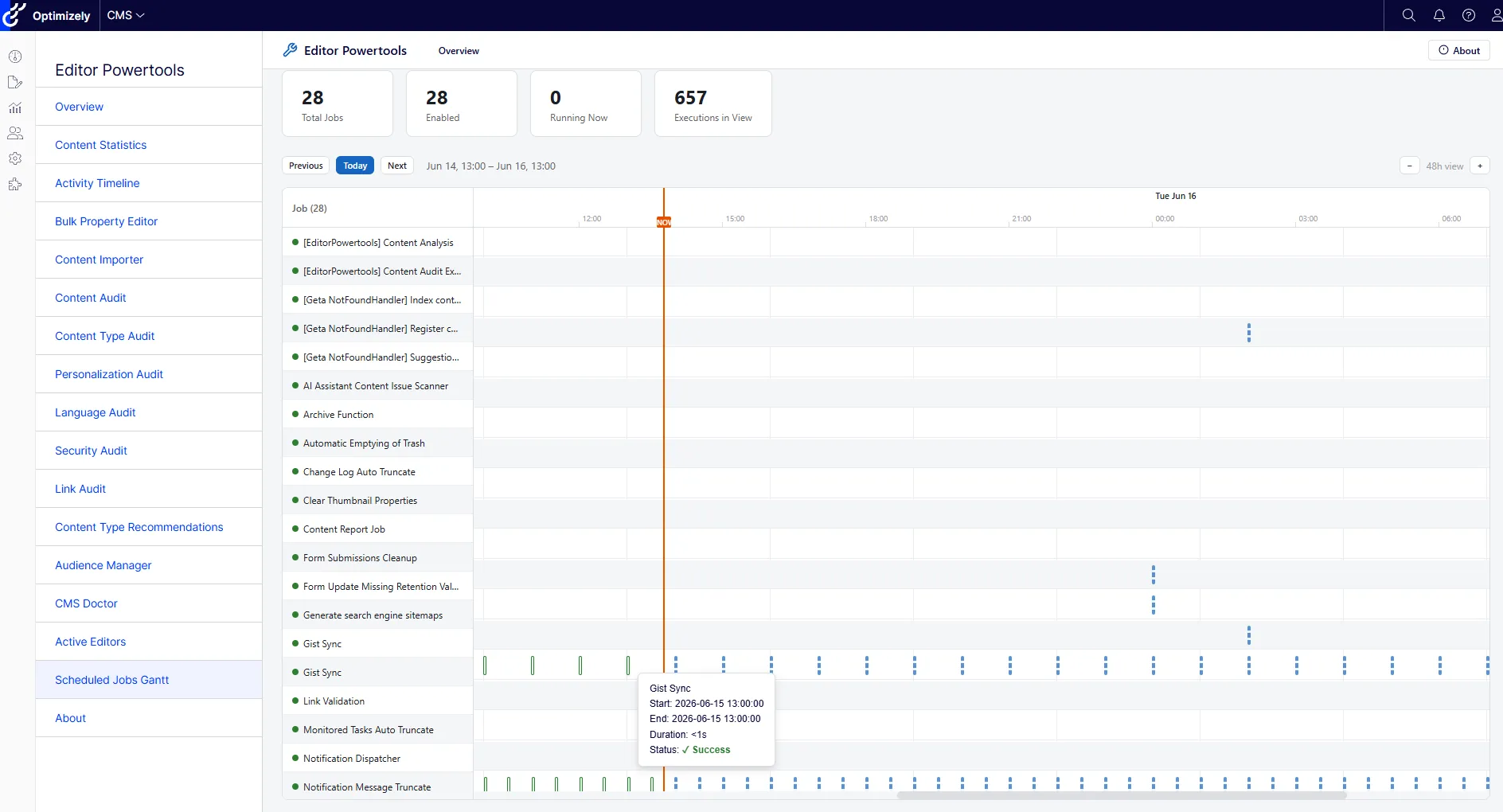
The Scheduled Jobs Gantt covers the work the site does by itself. Every Optimizely installation runs a quiet nightly economy of scheduled jobs — indexing, link checking, archiving, integrations pulling data in. When one of them silently fails, nobody notices until something downstream goes stale and a support ticket arrives wearing a disguise. The Gantt chart shows execution history on an actual timeline: which jobs ran, how long they took, which overlap, and when the next runs are planned. “Why is search stale?” and “what is the server doing at 3 a.m.?” stop being log-diving expeditions and become a chart you can scroll.
What I’d change about how the work gets scoped
Stop scoping batch work as page work. When the brief says “update the titles”, the first question is how many. The answer decides whether this is an editing task or a tooling task, and getting that wrong is how half a day disappears.
Let editors finish what the audit started. An inventory of stale content is only useful if acting on it doesn’t require a developer. The audits from the previous post find the work; the bulk tools are what let the people closest to the content actually do it.
Rehearse every import. If a migration tool doesn’t have a dry-run mode, the first production run is the dry run — you’ve just chosen to do it with live data.
Next in the series: CMS Doctor — the pluggable health-check dashboard, how to extend it, and why pluggable checks are the right shape for problems that accumulate quietly.
Try it
The productivity tools ship in Editor Power Tools, the open-source Optimizely CMS 12 and 13 add-on from the launch post. MIT licensed, one NuGet package, multi-targeted across both CMS majors. Install it, register the middleware, and the Bulk Property Editor, Content Importer, Activity Timeline, and Scheduled Jobs Gantt are all in the menu.
If you’ve got a batch job you’re currently dreading — a rename, an import, a cleanup the audit told you about — I’d like to hear whether these tools get you there, and where they fall short. Open an issue or a PR; that’s the most direct line in. And if the wider setup is the problem — content-model debt, a migration on the horizon, editors working around the platform instead of with it — Optimizely is what we do.