

Four prompts, fourteen agents and one evening: how AI agents rebuilt umage.ai on Optimizely CMS 13 with Visual Builder, starting from an empty folder. What it cost, what it reached for, the CMS 13.5.1 gotchas it hit, and the caveats that keep the four hours honest.
On Monday I was on stage at Villa Copenhagen for the Optimizely Copenhagen Developer Meetup. Hristo Bakalov, Lead Solution Architect for the Nordics at Optimizely, hosted the evening, and Piotr Nowak from Rockwool gave his first talk at the meetup, an honest walk through moving from on-premises infrastructure to Optimizely DXP. My slot was called “Brilliant and ignorant”, about what agents need before they’re any use on an Optimizely project.
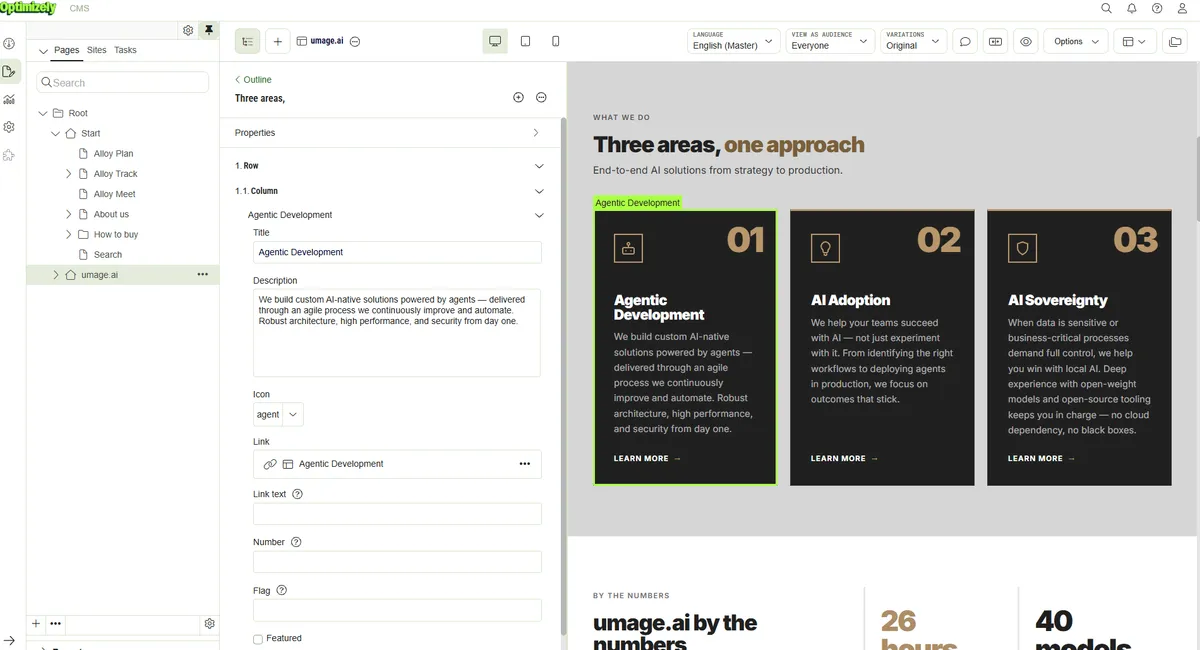
The centrepiece was something I’d done the Thursday before. I opened an empty folder, typed one long brief, and asked a team of agents to rebuild our own site, umage.ai, on Optimizely CMS 13 with Visual Builder.
Four hours and eleven minutes later it was done. I’d typed four prompts.
Migrations used to be projects
A platform migration used to be something you planned. A content model workshop, a design system to port, templates to rebuild, content to move by hand or by a script somebody wrote twice. For a site of fifty-odd pages that was weeks of work for a small team, and nobody was surprised when it turned into months.
So let me be precise about what I’m claiming, because the caveat matters as much as the number. umage.ai is a straightforward site. It’s static HTML out of Astro, with nothing behind a login, no integrations, no complex forms and no personalisation. A real customer migration has all of those, and every one of them is where the time actually goes.
But the part that used to be the bulk of the estimate, turning an existing site into content types, templates and imported content, is no longer the hard part.
Empty folder to running CMS in under seven minutes
The brief told the agents to collect whatever Optimizely skills we already had, to talk to two other agents for knowledge (our NuGet API reference agent and the agent that maintains EditorPowertools), to start a CMS 13 site and get it running, and then:
I also want you to see if you can recreate our umage.ai site on Optimizely CMS … I want you to work autonomously doing this. Install editorpowertools on it. Make sure everything works. Use dynamic workflows where it makes sense, with the cheapest models appropiate for the tasks.
The typo is mine, and it stays.
Here’s what happened in the next 6 minutes and 50 seconds, from the timestamps in the session log:
- 20:25 The agent read our shared knowledge vault, copied four Optimizely skills into the project and messaged the other two agents.
- 20:26
dotnet new epi-alloy-mvc. The folder had been empty until then. - 20:27 Two research subagents went off in parallel: one to work out the CMS REST API and MCP packages, one to crawl umage.ai and turn it into a content model.
- 20:27 It installed Editor Power Tools, our CMS add-on, and corrected a namespace error in the getting-started guide on the way. That guide is mine.
- 20:28 It drove a real browser through the first-run screen to create an admin user, which left it signed in to edit mode.
- 20:29 It added the official Optimizely MCP server and a community one.
- 20:31 It set up OAuth for the CMS REST API, fetched tokens and wrote the configuration for the CLI and MCP tools.
- 20:32 First commit. The CLI got registered against the site 45 seconds later.
Nobody clicked anything. That’s the warm-up.
Four prompts, and two words
The whole human side of the evening fits in a text message:
- 20:25 The brief.
- 21:22 “Ok. Skip Context7 for now. Let me know if I need to restart the session for the MCP servers or if I can just approve them.” I typed that at 20:42. It sat in the queue for forty minutes because the orchestrator was busy.
- 21:31 “Could we make it all work with visual builder?”
- 21:31 “Including design?”
Those last two words were the most expensive thing I typed all evening.
By then the agents had built a perfectly reasonable classic model: pages with content areas, filled with blocks for heroes, card grids, FAQs and stats. “Including design?” meant all of that went. In its place came six Experience page types, one Section type whose display templates carry 23 layout variants (that is the design system now), and 21 flat Element types.
The reason it had to be that drastic is the one thing about Visual Builder every Optimizely developer should know before they start. Elements are restricted to the property types Visual Builder supports, and those don’t include lists, content areas or nested blocks. A row of three stats isn’t one block with a list of three items. It’s three elements. Every list on the old site became one element per item, or a multi-line text field.
The skill in that transcript isn’t prompting. It’s knowing which two words change the architecture, and saying them while it is still cheap to change.
Who did the work
Fourteen agents took part: one orchestrator, thirteen subagents. One of the subagents was me typing /statusline mid-build, which cost four cents and built nothing.
The orchestrator ran on Opus and so did exactly one subagent, the Visual Builder conversion. Everything else ran on Sonnet, because the brief said cheapest model that can do the job and the orchestrator took that literally. Sonnet wrote 68% of the output tokens for 53% of the money.
The whole night came to $83.38 at Anthropic list prices, calculated from our own token counts, so read it as an estimate rather than a bill. Of the 302 million tokens, 98.6% were cache reads. Fresh input was 2,682 tokens. That ratio is why a four-hour, fourteen-agent session costs less than a decent dinner.
After 21:31 nobody was watching. That’s three hours and five minutes, 74% of the session, including the whole Visual Builder rebuild, the content import, two rounds of visual comparison against the live site and a code review.
It wanted eyes, not tools
I went into this expecting the MCP servers to be the story. I’d installed both of them.
Across about 1,540 tool calls, the agents drove a browser 325 times. The official Optimizely MCP server got called around 18 times, and when I went through the logs, most of those calls were the agent listing the server’s tools to see what it could do. Three did actual work. In fairness, the agent reached it over plain HTTP rather than loading it natively, because loading a new MCP server meant restarting the session. That friction is itself part of the story.
All content went in through the official CMS REST API: 58 pages, 57 media items and seven Visual Builder blueprints, written by an importer script that could be re-run. The house rule was to fix the importer, never the content by hand. But the browser was how the agents knew whether any of it worked.
That mattered, because four of the bugs they found compiled perfectly and looked fine in the code:
- White hero text on a white background.
- Cards that never appeared, because the reveal class was never applied.
- Styles copied from Astro’s
:global()selectors, which browsers drop without a word. - A phone link that came out as
tel:tel:.
An agent that only reads its own code will tell you, confidently, that it is done. One that takes a screenshot at 1440 and 390 pixels and compares it to the live site doesn’t get to. The final fidelity report has nearly every page matching. The remaining gaps are the animated canvas backgrounds and the RSS links.
Give your agent eyes before you give it tools.
What will bite you on CMS 13.5.1
These are all real, all hit during the evening, and all written into the project’s notes so the next session doesn’t rediscover them:
REST writes return 403 and won’t say why. OAuth clients show up as “API keys” under Settings › Access Rights, and they need rights there. Role and claim mapping in the site doesn’t reach the API. It took three wrong theories to find a checkbox.
REST property values are wrapped. Write {"Title":{"value":"…"}}, not {"Title":"…"}. Rich text inside a composition is {"value":{"html":"…"}}, references are cms://content/<guid>, and a create returns 201 with the new key only in the Location header.
You can’t turn an existing page type into an Experience. The base-class change is refused at start-up while the type exists. Remove the type, then re-add it with the same GUID.
Display template choice keys need at least two characters. "2" fails. "two" works.
Settings dropdowns ignore automated clicks. If you’re driving the admin UI from Playwright, dispatch the mouse events from page script.
And two that I’d call bugs:
Uploading an SVG over about 4 KB through the REST API returns a 500. The CMS scans uploaded SVG and HTML files for scripts, and the scanner reads the request body synchronously, which ASP.NET Core doesn’t allow once the body is past what’s already buffered. 27 out of 27 SVGs failed. A 1.6 KB favicon and a 3.2 MB PNG went through. Uploading through the CLI works.
Changing a Visual Builder Style doesn’t refresh the preview. The style is saved, but the event the preview listens for is never raised. The agent took 28 minutes and 149 tool calls to find that one, by decompiling 13.5.1 and comparing the websocket traffic with and without a fix. Our fix is 40 lines of middleware, and it will need checking on every upgrade.
I haven’t filed either of them through Optimizely’s bug process, which is cumbersome enough that it would have taken longer than finding them. I did hand them to Hristo at the meetup, which is the next best thing.
Pointing at it
The site was done, but “done” from an agent still needs a human to look at it. For that we added Redline, our open-source review overlay, to the CMS 13 site.
Press Alt+Shift+R on any page and you can pin a comment on an element, edit its text or sketch over it. Each note is saved with a screenshot, the Razor file and line, and the exact CMS content it belongs to. On a Visual Builder page it names the composition node itself, down to the element and property, so the agent doesn’t have to guess which of three identical stat elements you meant. Text edits save as a CMS draft under your own account and never publish.
On the afternoon of the meetup I left two notes on the home page: “make the hero subtitle larger”, and a scribble around one of the stats saying “remove this”. The agent made the CSS change, removed the element from the composition and from the importer data so it wouldn’t come back, ticked both notes and replied to them.
What I’d tell anyone planning a CMS 13 migration
Decide on Visual Builder before you model anything. Its flat elements change the content model from the ground up. Deciding afterwards cost us a full rebuild of the model. It was cheap because agents did it in 48 minutes, but on a human team that’s the week you lose.
Give the agents a browser and make them look. Screenshots against the live site caught the bugs that compiled. MCP servers are useful, but a browser the agent can drive and look at is what tells it the work is right.
Keep the importer, not the content. If every page comes from a script you can re-run, every mapping mistake is a one-line fix and a re-import, not a hunt through the editor.
Use the expensive model to decide and the cheap one to do. One Opus orchestrator and one Opus subagent on the hardest problem. Everything else was the cheaper model, and it was fine.
Write the gotchas down. Every session that doesn’t know about the API key checkbox will spend half an hour finding it again. Ours are in the project notes now, which is the start of a much bigger idea, and the subject of my next post.
If you’re planning a move to Optimizely CMS 13, a move away from it, or an upgrade from 11 or 12, get in touch. Your site will have the integrations, logins and personalisation ours didn’t, and those still take real work. But with our agents doing the rebuilding, the estimate looks very different from the one you’d get in a normal migration project. Upgrades have their own offering, and Optimizely is what we do.
The four hours aren’t the interesting number. The interesting number is four prompts. The work that’s left for people is knowing what to ask for, and looking at what comes back.